 CK Core Motif
Toolbar
XmToolbar is an opt-in client-area action strip. The application supplies
stable action IDs, labels, optional shortcut text, priority and an explicit
overflowable flag. The toolbar copies the IDs and XmString values; it
does not own the application's action model or user_data.
When space is constrained, non-overflowable actions remain in the strip and
overflowable actions are selected by descending priority. Remaining actions
are placed in an ordinary Motif pulldown menu behind the More cascade
(XmNtoolbarOverflowLabel), and XmToolbarGetOverflowCount reports how many
are there. The toolkit preserves action IDs and dispatches both the strip and
menu entries through XmNtoolbarActivateCallback; shortcut text is retained
and shown with the action label, but applications remain responsible for
global accelerator policy.
Toolbar buttons and overflow entries do not dispatch an action while the
Toolbar or an ancestor is insensitive. XmToolbarInvoke remains the explicit
programmatic dispatch API.
XmNtoolbarOverflowLabel is optional. Passing NULL at creation or through
XtSetValues creates an intentionally blank overflow cascade label; both
paths have the same safe behavior.
The toolbar owns only its push-button and menu-entry presentation children. It does not create a navigation model, launch commands, or change existing menus and toolbar widgets. Accessibility exposes a named toolbar panel and reports one action when an overflow menu is available.
Presentation children use normal Xt geometry negotiation. A request matching
the toolbar's assigned dimensions completes immediately; incompatible requests
receive a precise XtGeometryAlmost reply rather than triggering a repeated
negotiation cycle.
Per-action icons and button surfaces
XmToolbarGetActionButton(toolbar, index, overflow) returns the normal action
button when overflow is False, or its overflow-menu entry when True.
Invalid inputs return NULL. The returned widget is borrowed: the toolbar owns
it and destroys it when XmToolbarSetActions replaces the action model.
Applications can use that button's public resources to configure icons,
accessible names and tooltips without relying on presentation-child names or
ordering. Query its XmNbackground, XmNforeground and XmNarmColor when
rasterizing images. The toolbar background can differ from the button face.
Set both XmNlabelPixmap and XmNarmPixmap to images composited against their
respective surfaces. Set XmNlabelInsensitivePixmap against the normal surface
with XmNinsensitiveForeground (or the documented bottom-shadow fallback).
The application retains image ownership and must keep these pixmaps alive.
XmToolbarSetActionIcons remains the convenience API for borrowed pixmaps that
already suit all of their destination surfaces.
The gallery binds each normal and overflow button independently, retaining and refreshing its normal, armed and disabled image-cache references as the button's colors or display scale change. Transparent SVG pixels and monochrome fallback backgrounds are therefore composited against the actual destination color. This avoids rectangular patches in light/dark themes and while a button is pressed or disabled.
The Mac qualification record records the reproduced old-factory failure and passing corrected rendering. The native regression uses the real gallery factory, samples the rendered icon corners during normal, pressed and disabled states, and checks overflow image resources across four profiles and two scales. It runs on an isolated Xvfb server, without sending input to the user's desktop:
python3 tests/automated/run-toolbar-icon-surfaces.py \
  --build /absolute/path/to/build --results /absolute/path/to/fresh/results
Component demo
Captured gallery example and its corresponding source excerpt.
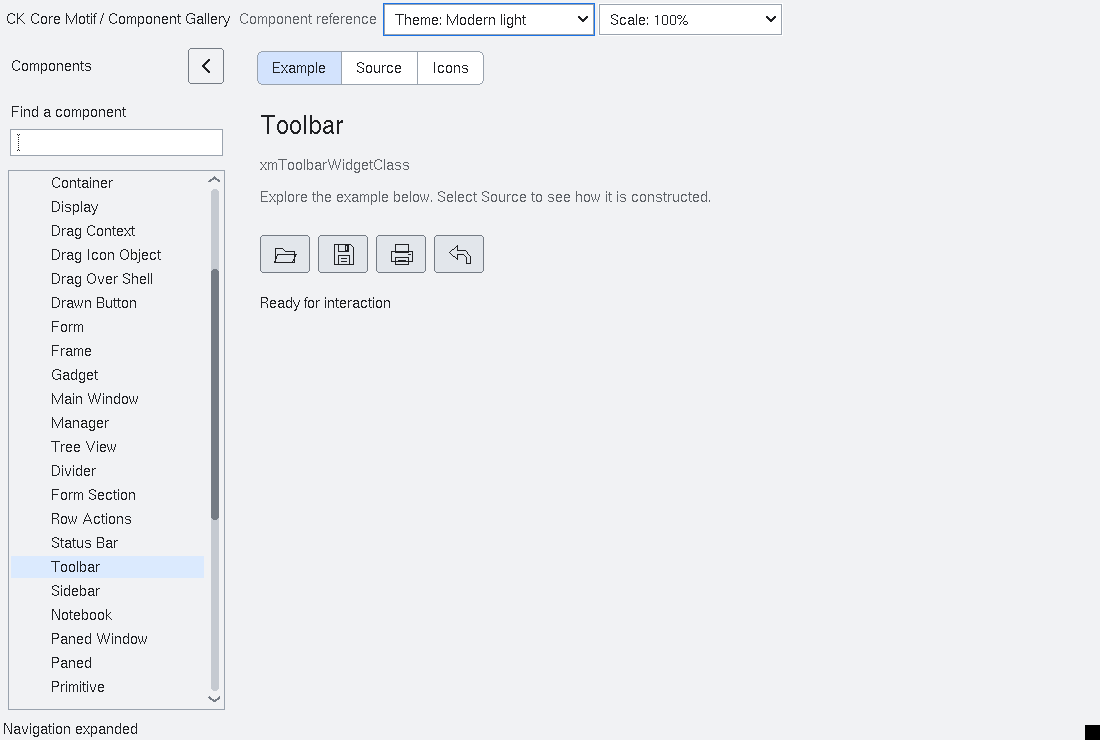
Actual gallery excerpt: class = xmToolbarWidgetClass. The host supplies parent, name, callback and client_data. Shared factory locals: Widget example; XmString label = NULL. The shared factory frees label, attaches callbacks and sizes the preview. Helpers and the complete factory are in gallery_examples.c.
XmToolbarAction actions[4];
XmString labels[4];
XmString shortcuts[4];
labels[0] = XmStringCreateLocalized((char *)"Open");
labels[1] = XmStringCreateLocalized((char *)"Save");
labels[2] = XmStringCreateLocalized((char *)"Print");
labels[3] = XmStringCreateLocalized((char *)"Undo");
shortcuts[0] = XmStringCreateLocalized((char *)"Ctrl+O");
shortcuts[1] = XmStringCreateLocalized((char *)"Ctrl+S");
shortcuts[2] = XmStringCreateLocalized((char *)"Ctrl+P");
shortcuts[3] = XmStringCreateLocalized((char *)"Ctrl+Z");
actions[0] = (XmToolbarAction){"open", labels[0], shortcuts[0], False, 0, NULL};
actions[1] = (XmToolbarAction){"save", labels[1], shortcuts[1], False, 0, NULL};
actions[2] = (XmToolbarAction){"print", labels[2], shortcuts[2], True, 5, NULL};
actions[3] = (XmToolbarAction){"undo", labels[3], shortcuts[3], True, 4, NULL};
example = XtVaCreateManagedWidget((char *)name, class, parent, NULL);
XmToolbarSetActions(example, actions, 4);
{
    static const char *const icons[]={"action_open","action_save","action_print","action_undo"};
    static const Boolean overflow_modes[] = {False, True};
    for (Cardinal i = 0; i < XtNumber(icons); ++i) {
        for (Cardinal mode = 0; mode < XtNumber(overflow_modes); ++mode) {
            Widget button = XmToolbarGetActionButton(example, i,
                                                     overflow_modes[mode]);
            if (!button) continue;
            /* Rasterize transparent image pixels against the actual
             * normal/pressed surface, not the toolbar's background. */
            gallery_bind_icon(button, XmNlabelPixmap, icons[i]);
            gallery_bind_icon(button, XmNarmPixmap, icons[i]);
            gallery_bind_icon(button, XmNlabelInsensitivePixmap, icons[i]);
            XtVaSetValues(button, XmNlabelType, XmPIXMAP, NULL);
        }
    }
}
if (callback)
    XtAddCallback(example, XmNtoolbarActivateCallback, callback, client_data);
XmStringFree(labels[0]); XmStringFree(labels[1]);
XmStringFree(labels[2]); XmStringFree(labels[3]);
XmStringFree(shortcuts[0]); XmStringFree(shortcuts[1]);
XmStringFree(shortcuts[2]); XmStringFree(shortcuts[3]);