Text and source editing
Memo is a compact form control. Use EditorDocument and TextEditor when
the application edits a real document: selections are revision-bound,
undo/redo is document-wide, syntax styling is profile-driven, and a file
workflow remains explicit through an injected FileSystem.
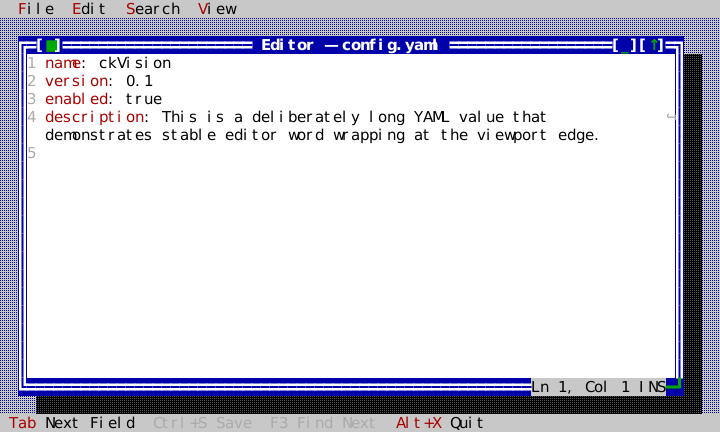
The source is compact but complete: editor_app.hpp,
editor_app.cpp, and
main.cpp. The application owns the document,
profile registry, injected filesystem/controller, Desktop, and Window; the
Window owns the TextEditor and its status overlay.
Build and run the actual example on a POSIX host:
cmake -S . -B build
cmake --build build --target ckvision_editor
./build/examples/ckvision_editor
Its ownership is deliberately ordinary and explicit:
Application
└─ EditorApp
   ├─ EditorDocument (shared model)
   ├─ SyntaxProfileRegistry
   ├─ MemoryFileSystem → FileEditorController
   └─ Desktop → Window → TextEditor + status frame overlay
auto document = std::make_shared<widgets::EditorDocument>("name: ckVision\n");
widgets::SyntaxProfileRegistry profiles;
widgets::register_standard_syntax_profiles(profiles);

auto editor = std::make_unique<widgets::TextEditor>(document, &profiles);
editor->set_file_name("config.yaml");
editor->set_show_line_numbers(true);
window->set_content(std::move(editor));
The application owns the shared document and profile registry; TextEditor
borrows both. A document can therefore be used by more than one editor, a
search panel, and a file controller without global state or widget-local copies.
For the common one-window case, EditorWindow composes a Window,
TextEditor, FileEditorController, dirty title, and bottom-frame status
overlay. Its normal close request vetoes a dirty document; map a client's
Save/Discard/Cancel UI to request_close() before calling close(). An Ok
answer (a successful Save, or Discard) lets the following close() through
until the text changes again. The
lower-level EditorDocument, TextEditor, and FileEditorController remain
available for applications with a different shell.
EditorWindow::open(path, EditorOpenOptions{...}) forwards the same explicit
malformed-input policy as the lower-level controller, rather than adding a
second, implicit conversion rule.
set_word_wrap(true) reflows only the viewport: it never adds document
newlines or changes the stable logical line/column reported by status().
Each continued display row ends in ↪, so a wrapped source line is visibly
distinct from a real line ending. The shipped editor example enables wrap and
puts its live Ln <line>, Col <column> status in a bottom-right window-frame
overlay; resizing and reflow therefore do not make the position ambiguous.
The focused editor also publishes a terminal caret: a bar in insert mode and a
block in overwrite mode. Arrow keys move by grapheme, Ctrl+Left/Right by word,
Ctrl+Home/End by document, and Tab inserts tab_width() spaces — four unless
set_tab_width() says otherwise. Up and Down return to the column the caret
left: moving down through a short line and on to a long one lands where the
walk started, and only horizontal motion or an edit sets a new column.
PageUp and PageDown move the caret by the viewport less one row and scroll the
view with it, so the caret keeps its place on screen; with Shift they select
the paged range.
Printable character events insert their terminal-provided UTF-8 text; Shift is
part of normal text production, so uppercase and shifted symbols insert just
like unshifted text, while Alt/Ctrl/Super character chords remain available to
commands.
Adding Shift extends the primary selection for every cursor movement, including
Ctrl+Shift+Left/Right/Home/End. Ctrl+C/X/V use the application clipboard;
Ctrl+Insert/Shift+Insert are equivalent copy/paste bindings, and Shift+Delete
cuts the selection. Delete and Backspace erase a selection or one grapheme,
while Ctrl+Delete and Ctrl+Backspace erase forward/backward by word.
set_read_only(true) leaves navigation and selection available but rejects
mutation; inherited set_enabled(false) rejects keyboard, text, and mouse
editing input entirely.
EditorStatus also exposes the shared document's UTF-8 encoding and preferred
LF/CRLF/CR newline form, so a client status line can report format without
re-reading or parsing the file.
EditorStatusModel subscribes to one TextEditor and mirrors those snapshots
for a client-owned status bar, frame overlay, or other presentation; it has no
window ownership or global registration requirement.
For a large source file, profile work need not run as one unbounded task.
SyntaxCache::update_bounded(profile, lines, maximum_lines) relexes no more
than the requested number of logical lines. A false
SyntaxRelexReport::reached_fixed_point means the client should schedule
another ordinary application task with the same current lines; the cache
resumes deterministically at its recorded invalidation point. update() is
the complete-pass convenience for small documents and documentation tooling.
Mouse drag selection remains active while the pointer leaves the editor's top
or bottom edge: the viewport scrolls one display row per move event and the
selection continues from the clamped edge cell. This keeps drag selection
deterministic in terminals without timer-driven mouse auto-repeat.
A double click selects the clicked ASCII source word (or a single non-word
grapheme). Terminals report only presses and releases, so the Application
counts two presses of the left button on one cell within
ui::kDoubleClickIntervalNanos of each other as a double click, timed on its
injected Clock and never on the wall clock (MouseEvent::click_count; see
the input decoder). The
second press selects and starts no drag. A wheel notch scrolls
ui::kWheelRows display rows and leaves the caret where it is.
Commands and key bindings
The verbs a reader also finds in an Edit or Search menu — undo, redo, cut,
copy, paste, select all, find the selection, find next and previous, and the
overwrite toggle — are EditorCommand values, and the chords that run them are
data. default_editor_key_bindings() is what every editor starts with:
| Chord | Command |
|---|---|
| Ctrl+Z / Ctrl+Y | Undo / Redo |
| Ctrl+X, Shift+Delete | Cut |
| Ctrl+C, Ctrl+Insert | Copy |
| Ctrl+V, Shift+Insert | Paste |
| Ctrl+A | SelectAll |
| Ctrl+F | FindSelection |
| F3 / Shift+F3 | FindNext / FindPrevious |
| Insert | ToggleOverwrite |
A focused view sees a key before the application's command keymap, so an
editor that answered Ctrl+F itself would keep the chord from an application
whose own Find lives there. set_key_bindings() replaces the list: an
application that owns its commands and keyboard scheme gives the editor the
bindings it wants — often none — and runs the same verbs through
TextEditor::perform() from its own command handlers. A chord the editor does
not bind reaches the keymap like any other key. perform() reports whether the
verb did anything, so an undo with nothing to undo is visibly a no-op.
Edit requests
Every change the reader asks for — typing, a paste, Enter, Tab, the four
deletions, a cut, replacing the current search match or every match — is
described as an EditRequest before anything is committed: its EditKind, the
text the reader supplied, and the edits the editor would commit as one
transaction (one current range and its replacement, including any padding a
virtual caret needs; one per match for ReplaceAll). set_edit_handler()
receives each request first. Return true after handling it — typically by
committing a transaction of the host's own and restoring a current selection
with set_selection() — and the editor commits nothing; return false, having
changed nothing, and the editor commits edits itself.
That one seam serves two kinds of host. One keeps its own editing rules — a language-aware line break, a session whose undo steps are named "Typing", "Paste" or "Cut" and which decides what folds into one step — and acts on the request's intent. The other only wants to observe or veto, and commits the described replacement. The handler is never called for a read-only or disabled editor, so a rule cannot bypass either safeguard; undo and redo, which change the text as much as typing does, are refused there too, and the history handler is not called.
A caret past the text
With set_virtual_space(true), a double-click right of a line's end, or below
the last line, places a VirtualCaret there instead of snapping to the
nearest position. Nothing is written: the status reports the provisional
line and column (EditorStatus::virtual_caret says it is one), and the
terminal caret sits in the blank cell. The first text to arrive — typed,
pasted, a line break or an indent — supplies the line breaks and spaces needed
to reach that cell together with the text, as one edit. Any caret motion, a
click elsewhere, or a deletion abandons the provisional caret and leaves the
document byte-identical. A host restoring one after its own transaction calls
set_virtual_caret(), which refuses a position that is not past the text.
Host colouring
A syntax profile lexes one line at a time, which suits source languages. A host
that already parses the whole document — whose colouring depends on context a
line lexer cannot see — hands the editor its own result instead:
set_highlights(revision, spans) takes ordered, non-overlapping
HighlightSpans over the document's current revision, each naming a theme
role. They replace the profile's colouring entirely; text they leave unmarked
is plain text. A span for a stale revision is refused. An edit keeps the spans
it does not touch, shifted with the text, and drops the ones it overlaps, so an
asynchronous host never flashes the whole document plain while it recomputes.
clear_highlights() returns to the profile. A grapheme takes the style of the
span that contains its first byte. Selection and search matches still paint
over host colouring.
Context menus
set_context_menu_handler() is asked for a menu on a right click, on a
Ctrl+click — for terminals that keep the right button for their own selection
— and on the Menu key or Shift+F10, which ask at the caret
(is_keyboard_context_menu_request). A click first places the caret at the clicked cell unless
it lands inside the selection, so the menu acts on what the reader pointed at.
The handler receives the screen cell the menu belongs at and typically calls
show_context_menu(). Without a handler those events are not the editor's.
Positions and edits
DocumentPosition carries both a byte offset and the document revision that
created it. Obtain positions through position_at_byte() or
position_at_line_column(); both reject a byte inside a grapheme cluster.
replace() rejects stale positions instead of applying an offset to changed
text. Use DocumentTransaction to make several non-overlapping edits against
one revision and advance the revision once.
Every change notifies observers with one DocumentChange describing a single
covering replacement: the old bytes [replaced_begin_byte, replaced_end_byte)
became the inserted_bytes bytes that now start at replaced_begin_byte. A
transaction of several separated edits is reported as the span from its first
edit to its last, an undo or redo as that same span of the transaction it
reverts or replays, and a set_text() as the whole document, so an observer
carries a position through any change with the same arithmetic.
undo() and redo() return that change, and it carries the selection to
restore: DocumentTransaction::set_selection_before() records the selection an
edit was made at with its undo step, an undo hands it back (or a caret after
the restored text when none was recorded), and a redo hands back a caret after
the replayed text. TextEditor records it for every edit it commits, and its
Undo and Redo verbs select what the step hands back, so the caret returns to
where the change was; other views of the same document carry their own carets
through the step instead. A host committing its own transactions from an edit
handler records the selection the same way. Edits of one
transaction that touch apply in a fixed order: insertions at one position land
in the order they were queued, ahead of a replacement beginning there.
subscribe_state() observes what is not text: mark_clean(),
set_preferred_newline() and set_utf8_bom() notify it when they change the
value, which is how a TextEditor republishes its status after a save.
When an application-level command transforms a current selection through its
own document transaction, it can call TextEditor::set_selection() with the
new current, grapheme-aligned DocumentRange. The editor restores that range,
scrolls it into view, publishes status, and invalidates normally; it never
accepts a stale revision or a byte inside a grapheme cluster. This is a direct
state API for controllers, not a request to synthesize cursor keystrokes.
Line/column and byte-position lookup use the persistent piece tree's byte and newline aggregates. A local edit therefore does not need to materialize the entire document merely to locate a line or validate a grapheme boundary.
The document stores valid UTF-8 and normalizes line endings to LF internally.
Malformed UTF-8 is rejected by default; applications that deliberately choose
replacement must set EditorDocumentOptions::invalid_utf8 to Replace.
The document records a leading UTF-8 BOM of loaded text separately from
editable text and remembers the first observed line-ending convention; in the
text of an edit, U+FEFF is an ordinary character and is kept. FileEditorController
uses those explicit metadata values to write a UTF-8 BOM and CRLF/CR/LF form
back on save. max_document_bytes is an optional atomic document limit: an
oversize set_text() or transaction returns LimitExceeded without changing
the document or its revision.
FileEditorController::open(path) also rejects malformed UTF-8 by default.
Pass EditorOpenOptions{InvalidUtf8Policy::Replace} only when the client has
made an explicit replacement decision for that particular load.
It also refuses to replace a modified document by default. After the client
has presented Save/Discard/Cancel and the user chose Discard, pass
EditorOpenOptions{.modified_document = EditorOpenModifiedPolicy::Discard}
to perform that separately confirmed replacement.
Built-in profiles use explicit ASCII source-language grammar classification;
they never consult the host locale. Non-ASCII source text is retained by the
document and safely styled as plain/error text when a deliberately compact
profile has no corresponding rule.
EditorDocumentOptions::invalid_utf8 explicitly selects replacement or
rejection. The detected input newline style is retained as
preferred_newline() for a file controller to preserve on save.
Profiles and highlighting
SyntaxProfileRegistry is instance-owned. Register the standard profiles with
register_standard_syntax_profiles() for Plain text, JSON, YAML, Bash,
Markdown, and SQL.
Automatic detection uses an explicit requested profile, file suffix, content
prefix, and shebang; it never reads environment variables. A profile consists
of a stable ID, detector, and SyntaxLineHighlighter, so an application can
register another language without private headers.
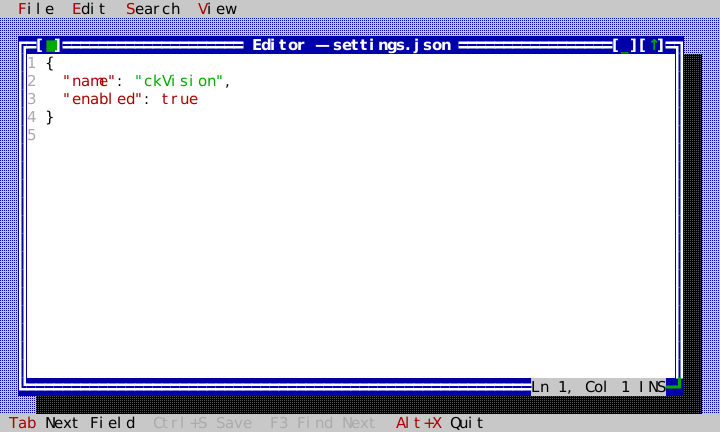
Highlighters return semantic SyntaxSpan values for one logical line and a
next lexical state. TextEditor turns those categories into semantic theme
roles (ckv.editor.syntax.*) while preserving selection priority.
Choose View → Classic, Dark, Light, or Mono in the runnable
editor to change the scheme without losing the document, search selection, or
caret. The scheme command calls Application::set_theme() while the editor
window is open.
The editor smoke suite also verifies that an active search selection and caret
survive all four built-in schemes when Application::set_theme() repaints
the retained tree after the theme change, and pins the Replace dialog under all
four schemes.
SyntaxCache is the deterministic incremental layer behind TextEditor.
It retains each line's incoming state, spans, and outgoing state; after an
edit it relexes forward only until an unchanged line has the same lexical
input and output again. Invalid or grapheme-splitting spans from an extension
are rejected before painting, so a highlighter cannot create a partial-glyph
style boundary.
To add a profile, construct a LanguageProfile with a stable identifier, a
detector that examines only LanguageDetectionInput, and a total
highlight_line function. The detector must return an explicit score and
reason; automatic selection uses the highest score, then stable identifier
order for a tie. A line highlighter receives the prior lexical-state string,
returns only grapheme-boundary spans within that line, and supplies the next
state. Register it on the application-owned SyntaxProfileRegistry; nothing
is process-global. The shipped JSON, YAML, and Bash profiles demonstrate
suffix, content-prefix, and shebang detection respectively.
The shipped profiles keep that rule by lexing a line one grapheme cluster at a
time. Their grammars are ASCII, and a cluster counts as the character its
first byte is: { with a combining accent is still an opening brace, a digit
with one still continues a number, and a token takes the marks on its last
character with it. A character outside a grammar is one token however many
bytes encode it, and a word with a mark on it, such as true with an accent
on the e, is no longer the keyword.
The SQL profile is detected by a .sql name or by a statement word at the
start of the text (SELECT, CREATE, WITH, PRAGMA and the rest), which
outranks YAML's bare "there is a colon somewhere" — a statement's bound
parameters put a colon in most of them. It paints keywords and declared types
(INTEGER, TEXT, …) as keyword and type, numbers with hex and exponents and
the literal words true, false and null as numbers, -- and /* */
comments as comments (the block one carries across lines), and a word
immediately before ( as a command, so an engine's own functions and an
application's registered ones are marked alike without naming any.
Two rules are worth knowing because they are where SQL misleads a reader.
Only '...' is text — a doubled quote inside it is one quote, not its end —
while "...", [...] and `...` are quoted names and are painted as
names: a reader sees at once that "abc" is not the text abc, which is the
mistake SQL's permissiveness invites. And a bound parameter (:name,
@name, $name, ?, ?1) is a name too, because it is what a saved
statement leaves for its caller to fill in; a lone : stays punctuation.
The Markdown profile is detected by a .md or .markdown name, by a
leading YAML front matter block (a --- line, key: value lines, a closing
---), or by an ATX heading on the first non-blank line; the front matter
outranks YAML's own content score, and a --- block that never closes stays
YAML. It paints ATX headings and strong emphasis as keywords, emphasis as a
type, code spans and fenced code as strings, link text as a property and the
link target as a string, block quotes as comments, list markers as operators
(ordered ones as numbers), thematic breaks and fences as operators, the front
matter's lines with the YAML rules, and ::name{...} directive lines as a
command with a property block. Its states are never empty: the cache hands
the first line an empty state, so an empty incoming state means the document
start, where a --- opens the front matter instead of drawing a rule, and a
fence: state carries a fenced block to the fence that closes it.
The complete INI extension sample compiles and runs in the test suite using only this public API. Its essential shape is deliberately small:
SyntaxProfileRegistry profiles;
register_standard_syntax_profiles(profiles);
profiles.register_profile(LanguageProfile{
    "ini", "INI",
    [](const LanguageDetectionInput& input) {
        return input.file_name.ends_with(".ini") ? LanguageDetection{90, "file suffix"}
                                                   : LanguageDetection{};
    },
    [](std::string_view line, std::string_view state) {
        SyntaxLineResult result;
        result.next_state = std::string(state);
        if (const auto equals = line.find('='); equals != std::string_view::npos) {
            result.spans.push_back({0, equals, SyntaxTokenKind::Property});
            result.spans.push_back({equals, equals + 1U, SyntaxTokenKind::Operator});
        }
        return result;
    }});
Search and files
EditorSearch::find_all() and replace_all() provide deterministic literal
search. Replace-all creates one document transaction: stale positions or an
invalid edit leave the document unchanged. There is intentionally no implicit
regular-expression engine. Case-insensitive and whole-word searches use
explicit ASCII source-token rules (A–Z, a–z, digits, and _), never
the host locale; every returned match still begins and ends on grapheme
boundaries. Neither rescans a line per match: the search tries a match only
where a cluster begins, in one walk of the document, and a transaction's
commit checks the ends of all its edits in one walk of each line they touch,
so replacing every comma of a one-line minified file stays proportional to its
size.
FileEditorController receives both the document and FileSystem. Its
open() and save() operations use file fingerprints and atomic write
requests; they refuse to overwrite a changed-on-disk file. save_as(path)
creates a new path only; an existing target returns Conflict unless the
caller deliberately supplies EditorSaveAsPolicy::Overwrite, which is itself
fingerprint-checked. The controller
does not access the host filesystem directly, which makes its full lifecycle
testable with MemoryFileSystem. Before a window closes, map its
Save/Discard/Cancel dialog result to request_close(); a dirty document never
silently closes or overwrites a detected external change.
Opening a different file follows the same rule: the default open returns
Conflict while the document is dirty, and only an already-confirmed discard
may opt into EditorOpenModifiedPolicy::Discard.
The shipped editor opens config.yaml from its injected in-memory filesystem
through this controller. Its File/Save command uses the same atomic workflow
and becomes available only after an edit, which keeps the example deterministic
while showing the exact client-side lifetime and command wiring.
The File > Open Sample submenu drives that same controller path for
config.yaml, settings.json, sample.sh, and notes.txt. It is a runnable
profile-detection tour: YAML, JSON, Bash, and the plain-text fallback are each
selected from explicit filename/content metadata, with no host probing. The
window title follows the opened sample, and a dirty-close confirmation names
that same file. Choosing another sample with unsaved edits opens a
Save/Discard/Cancel choice. Save must complete before the new file opens;
Discard explicitly drops those edits; Cancel keeps the current document.
A failed save or open leaves the current document visible and reports the
failure instead of silently ignoring the menu command.
| Command | Where | What it proves |
|---|---|---|
Save (Ctrl+S) | File menu and status line | injected atomic save and dirty enablement |
| Open Sample | File submenu | YAML/JSON/Bash detection and plain fallback |
| Undo/Redo, Cut/Copy/Paste | Edit menu | document transaction and clipboard paths |
Find Selection (Ctrl+F), Find Next (F3) | Search menu and status line | revision-bound literal search |
Replace... (Ctrl+R) | Search menu | one-at-a-time and all-at-once replacement, each one undo step |
Word Wrap (Alt+W) | Edit menu | viewport-only reflow and stable logical position |
Quit (Alt+X) | File menu and status line | application exit routing |
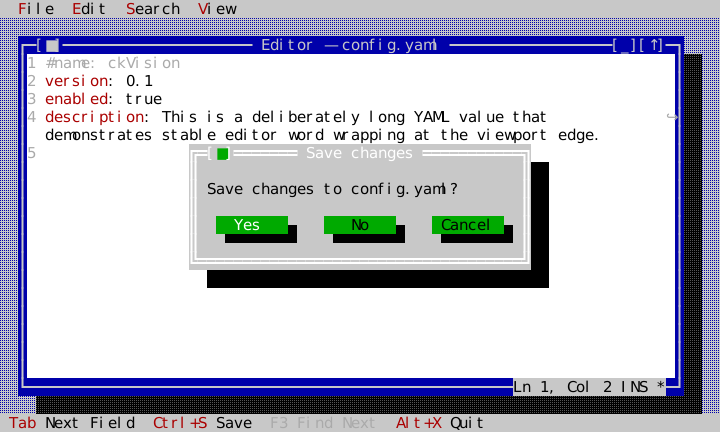
Its window-close request uses a non-blocking Save/Discard/Cancel confirmation:
Save invokes request_close(EditorCloseChoice::Save), Discard invokes the
explicit discard choice, and Cancel leaves the document and window untouched.
The modal dialog scopes background commands while it is open.
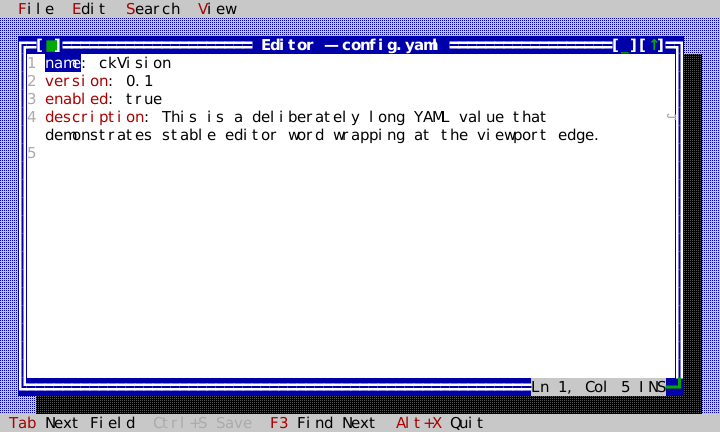
The TextEditor search facade keeps the current query and highlights all
revision-current matches. Ctrl+F uses the current selection as the literal
query, F3 selects the next match, and Shift+F3 selects the previous match.
Applications can call replace_current_search_match() or
replace_all_search_matches() for their own replacement UI; both are edit
requests like typing (refused by a read-only or disabled editor, offered to the
edit handler first), and the latter stays one document undo operation. The
current match follows its text through other edits and ends when an edit
touches it. The shipped example’s Edit and Search menus use
the same public methods and command enablement predicates.
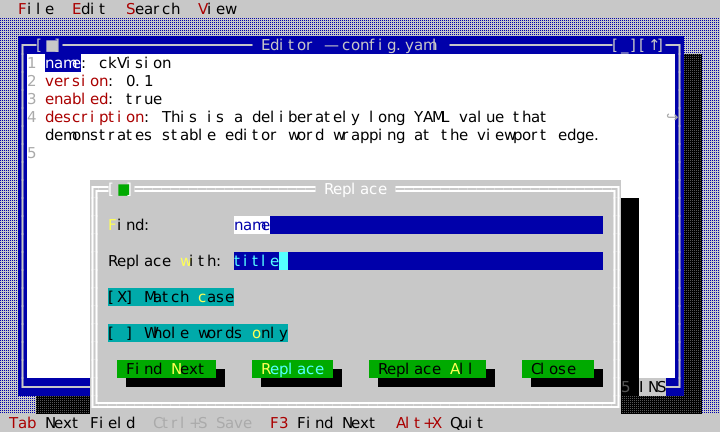
Search → Replace... (Ctrl+R) opens the example's Replace dialog over the
bottom of the desktop, so the document's first lines, and the match about to
change, stay in view. It offers the selected text (when the selection is on one
line) or the current query as Find, the last replacement as Replace
with, and the query's Match case and Whole words only options. Its
buttons are the registry's commands: Find Next is the same editor.find-next
command as F3, and Replace and Replace All are editor.replace-next
and editor.replace-all, hidden from menus and enabled only while the dialog is
open, because they act on what its fields say. Each press first makes the
fields the editor's query with set_search_query(), which keeps the current
match while it still matches.
Replace is the default button, so Enter in either field presses it. It
replaces the current match — the one Find Next last selected — and selects the
next, so the reader always sees what the following press will change before it
changes it; the first press, with no current match yet, only finds one. Each
replacement is one undo step. Replace All asks first, in a confirmation
opened on top of the still-modal Replace dialog, how many matches it is about
to change; Yes replaces them all with replace_all_search_matches() as one
transaction, so a single Undo takes every replacement back. No, or Esc, closes
only the confirmation, and focus returns to where it was in the Replace dialog.
A press of Find Next, Replace or Replace All that finds nothing says so in a
notice raised the same way, rather than doing nothing visibly. Close, or
Esc, closes the dialog and returns focus to the editor.
The dialog stays open between presses, which a presented descriptor dialog does
not: present_modal_dialog() closes on its default button. The example therefore
builds it from the same DialogDescriptor with materialize_dialog(), puts it
in a fixed-size Window with the dialog roles, sets that window's
accept_request and cancel_request itself, and presents it with
Desktop::present_modal().
See platform services for injected host services and the widget gallery for the public types.