Embedded terminal
TerminalView hosts an explicitly launched child terminal session inside a
normal ckVision window. It is not a pass-through to the parent terminal: the
child is connected to a private PTY (or ConPTY on the corresponding platform),
and ckVision alone presents the composed parent frame.
Hosts that own a persistent child collection may hold the portable
term::TerminalSubsession returned by launch_terminal_subsession().
snapshot(options) copies the grid and requested payloads, without copying
excluded history or images; status() reads scalars without either copy.
request_termination() asks the
child to finish without waiting (process-group signals on POSIX, private
ConPTY Control-C on Windows). Continue draining all sessions during the
host's grace period, then call request_kill() to end the child's process
tree if the user requested escalation. Both requests are idempotent;
drain() observes exit and close() releases resources. This lets a host
keep serving its other terminals while ending an uncooperative program.
The runnable POSIX example is ckvision_terminal. It launches the reader's own
interactive shell — $SHELL, falling back to /bin/sh — and reserves
Ctrl+Alt+Space to return command focus to the parent application. That
chord belongs to an ordinary command, Parent commands, which each terminal
names through TerminalView::set_parent_escape_command: the view reserves
whatever chord the command is bound to when a key arrives, and the status line
shows the same binding, so rebinding the command moves both. Its child
environment names only TERM and COLORTERM; the prompt, PATH and
everything else arrive from that shell's own startup files, so a window here
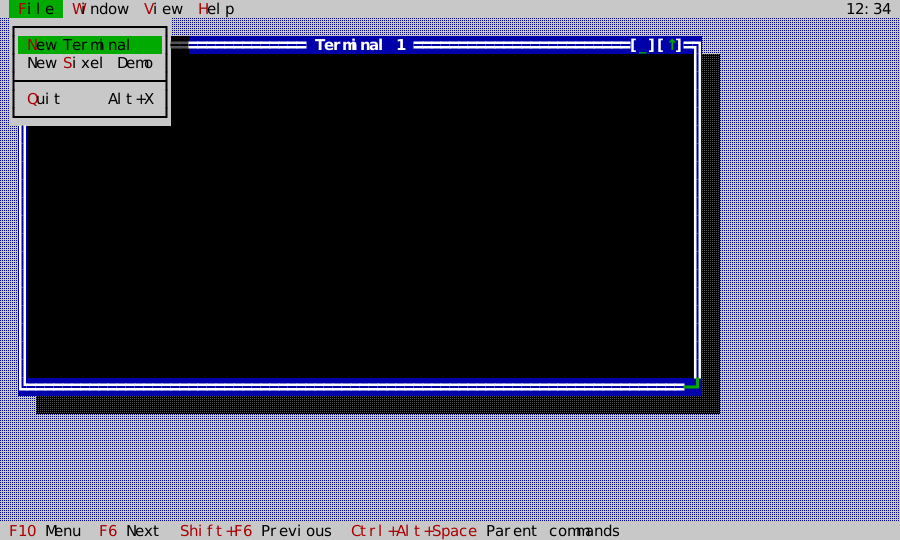
looks like a window in any other terminal on the machine. Choose File → New
Terminal to create another isolated shell window. Ctrl+Alt+Space moves
focus to the parent menu bar without sending that chord to the child. From
there, Window → Next/Previous (F6/Shift+F6) changes the active window,
while Window → Tile and Window → Cascade arrange every open terminal
window. Shift-dragging in a terminal selects visible cells and copies them to
the application clipboard. Choose File → New Sixel Demo to open a second
private child that emits a small Sixel sample before starting its interactive
shell. The child positions its prompt below the sample so its own text does
not erase the first row of pixels. With an outer Sixel profile the sample is
a clipped raster; with
NoGraphics the same private session uses its deterministic text fallback and
emits no outer raster bytes. When a child writes text over part of a Sixel
picture, its TerminalRaster::live_cells mask records which image cells remain.
TerminalView leaves the new text alone in both Sixel and NoGraphics modes;
the compositor emits only the surviving image regions. A null mask means the
whole picture is still live. Hosts placing their own masked images may pass
the same row-major byte mask to Painter::draw_image; zero excludes a cell
from the raster while the fallback callback paints that cell as appropriate.
| Initial shell | Full-screen alternate buffer | Nested child | Child Sixel on a graphics-capable outer terminal | Same child with no outer graphics |
|---|---|---|---|---|
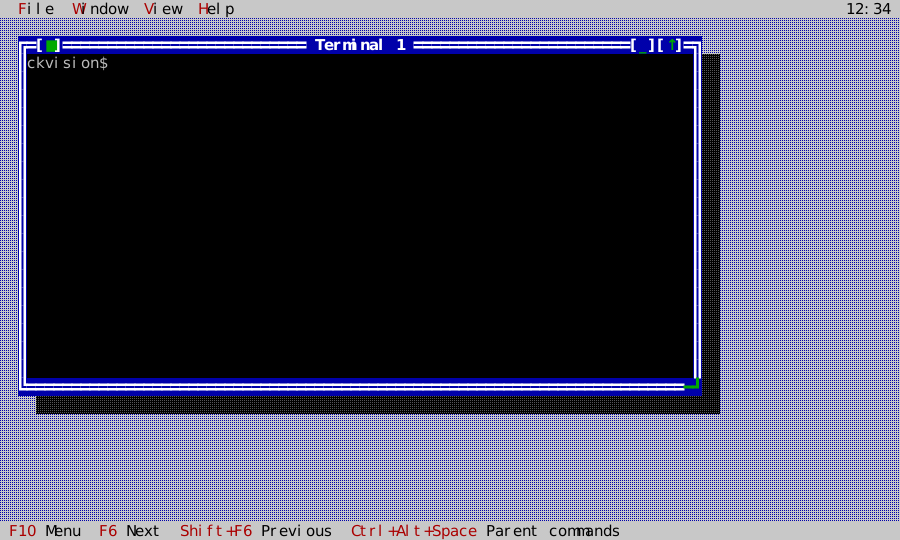 | 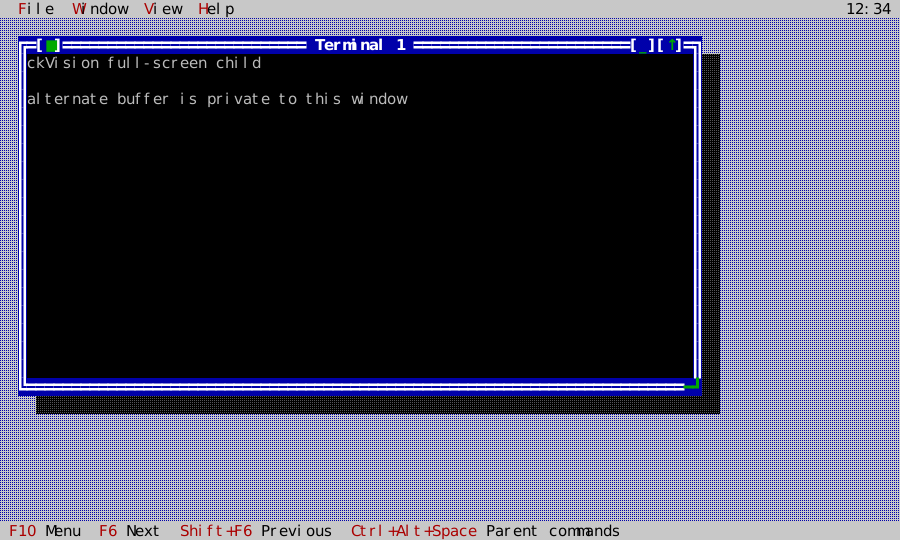 | 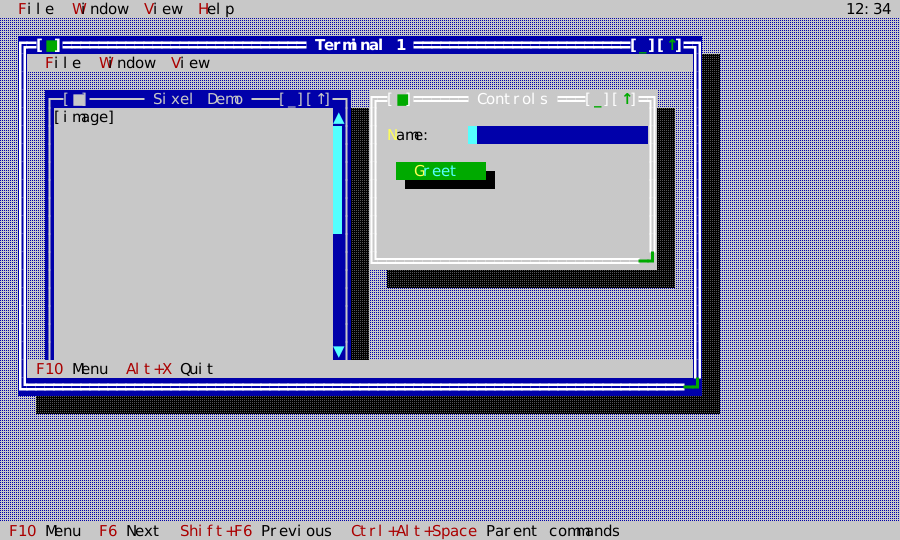 | 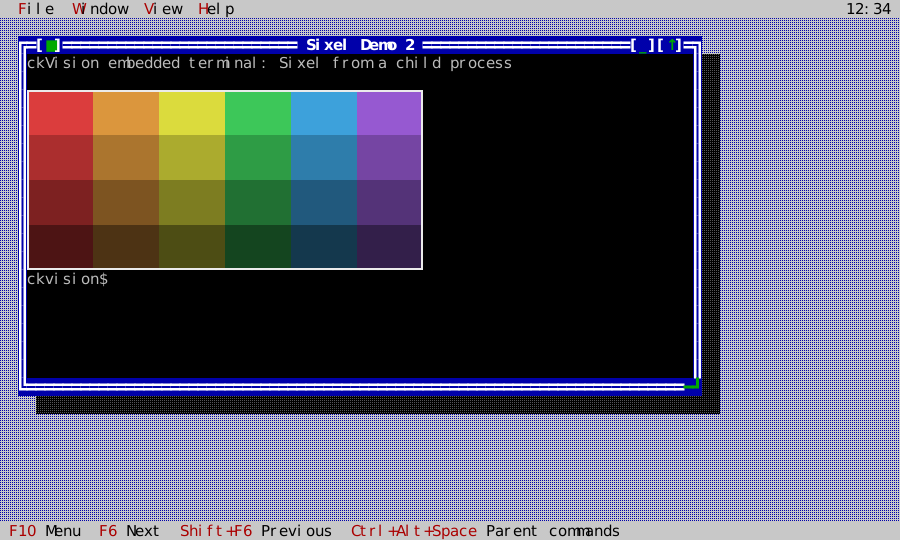 | 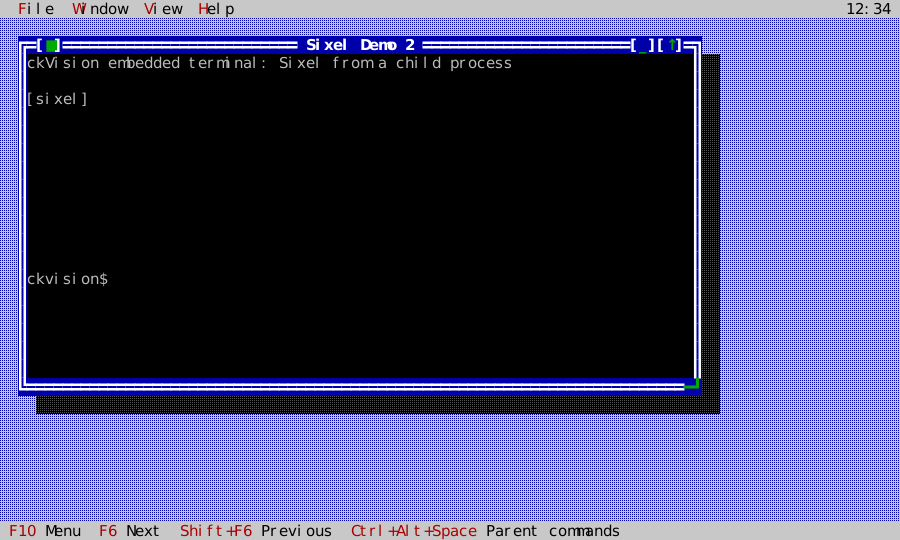 |
These captures run the shipped TerminalApp. The Sixel and fallback captures
feed its actual six-color demo bytes after the child is attached, with the
shell prompt below the picture.
With Sixel enabled at both levels, the nested Gallery's image also passes
through its private terminal, the outer TerminalView, and the outer presenter:
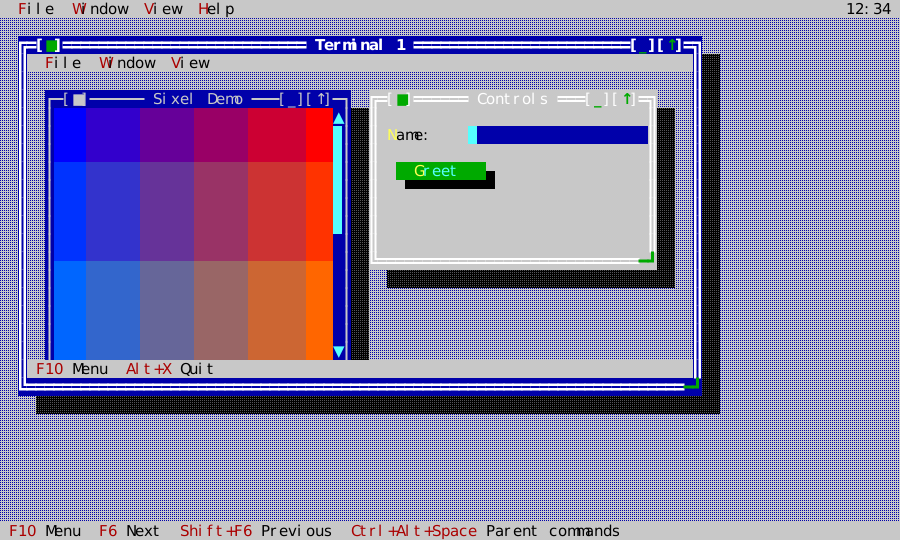
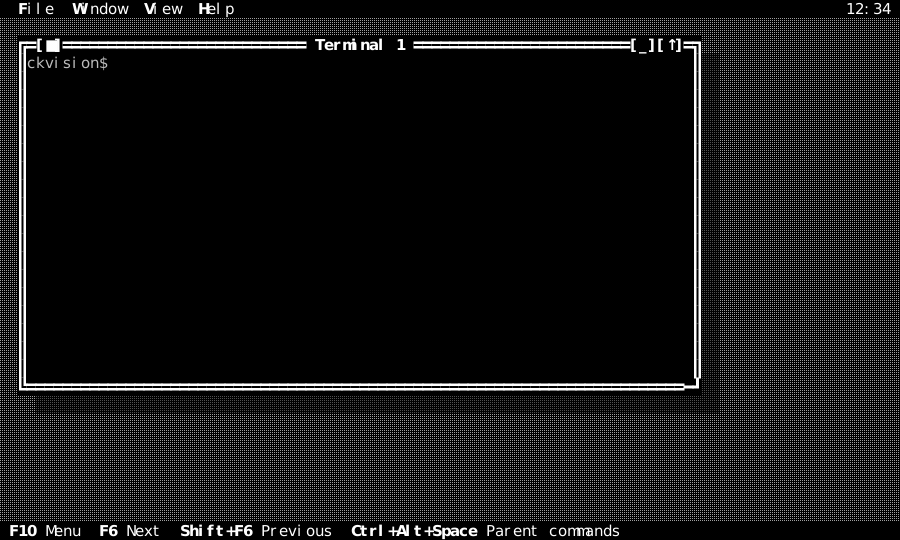
Choose View → Classic, Dark, Light, or Mono while the shell and Sixel Demo windows are open. The menu changes the outer desktop and window chrome immediately; the child terminal keeps its own VT colors and its decoded image.
The same shell path is exercised through every built-in presentation scheme, so menu chrome and terminal content remain visible as the application theme changes:
| Classic | Dark | Light | Mono |
|---|---|---|---|
| 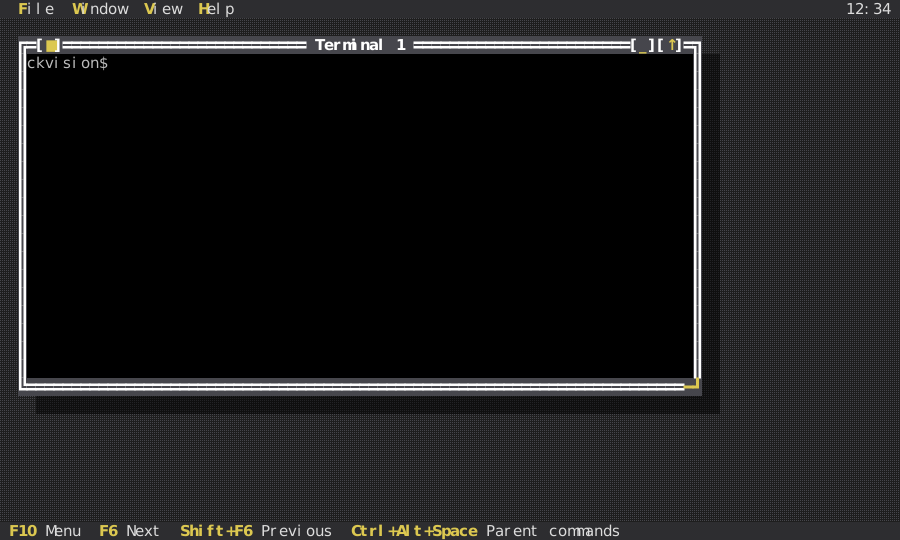 | 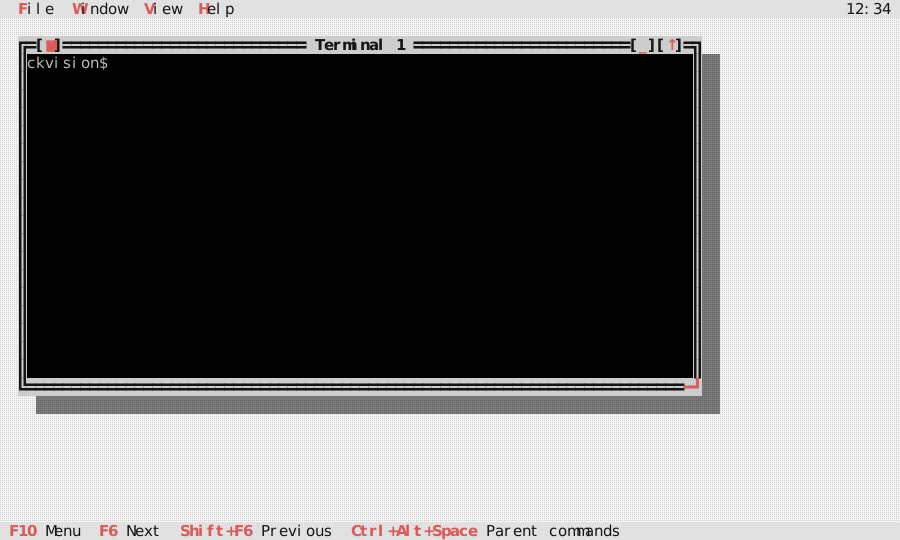 |  |
The initial shell, full-screen alternate buffer, and nested Gallery frames are
pinned as cell and RGBA goldens in all four schemes from the actual
TerminalApp window and TerminalView graph. The nested frames contain the
Gallery's real terminal output inside the child session. The generator supplies
an owned, deterministic child session and fixed local time through
TerminalAppServices; normal construction still launches the host shell
and reads the host clock. A supplied session factory must return a non-null
TerminalSubsession, which the application then owns.
The menu is regular ckVision chrome, including its opaque framed dropdown; it does not ask a child terminal to paint any parent UI. Menu pointer activation uses the normal press–drag–release contract: moving off an item cancels it, moving back re-arms it, and dragging across the top-level labels switches the open dropdown before release.
Launching a contained child
term::TerminalLaunchSpec shell = term::TerminalLaunchSpec::program("/bin/sh", {"-i"});
shell.profile = term::embedded_xterm_sixel_profile();
shell.environment = {{"TERM", "xterm-256color"}, {"COLORTERM", "truecolor"}};
shell.exit_policy = core::TerminalExitPolicy::TerminateAfterGrace;

term::TerminalSubsession& session = app.launch_terminal_subsession(std::move(shell));
auto terminal = std::make_unique<widgets::TerminalView>(session);
window->set_content(std::move(terminal));
TerminalLaunchSpec contains the executable, argv, working directory, child
environment and the policy governing it, child capability profile, and exit
policy. No shell is inserted implicitly.
On Windows, TerminalLaunchSpec::windows_command_processor(cmd_path, command)
explicitly executes trusted cmd command syntax. The named executable is still
required; ckVision does not select a shell. It uses /d /s /c, disables AutoRun,
and preserves the command's own quotes and operators instead of applying MSVC
argv escaping. Set the working directory and exit policy as for program().
The windows_command value is mutually exclusive with arguments and
argv0; an ambiguous spec fails before child creation. Invalid UTF-8/NUL and
the Windows command-line length limit are checked. POSIX refuses this form.
Commands are executable code, not an escaping API for untrusted strings.
An absent command, windows_command_processor(cmd_path), opens an interactive
cmd with /d; a present empty string executes an empty command and exits.
The explicit cmd form encodes the executable token with native backslashes,
so cmd cannot mistake a forward-slash path component for one of its switches.
The named executable still goes to CreateProcessW explicitly: there is no
PATH search or executable-name guessing. Ordinary program() launches,
including explicit PowerShell -Command arguments, retain their
argument-vector contract and do not rewrite argument data.
argv0 is separate from executable, and empty means "the executable path".
It exists for one convention: a shell is told it is a login shell by a
leading - on its own argv[0] (-zsh) and by nothing else — no flag every
shell agrees on does it. A host that opens login shells sets it; anything
else leaves it alone.
By default the child inherits the environment the host process is running in,
and the entries in environment are applied on top: they replace their
namesakes and add the rest. A terminal is a place to run the programs one
already has, and those programs expect the environment their owner
configured — HOME, USER, LANG, a shell's own settings. Withholding it
does not produce a neutral machine; it produces one where a shell reports its
own builtins as broken (cd: HOME not set), which reads as the program
failing rather than as the host having withheld something.
The invocation fields come from the shared
ProcessLaunchSpec; TerminalLaunchSpec adds only the
terminal profile and exit policy. Set environment_policy to
ProcessEnvironmentPolicy::ExplicitOnly for the
sandboxed case, where the child sees exactly what it was handed and nothing
else. The working directory is never inferred: it is whatever the spec says.
The child's signal dispositions are put back to their defaults and its signal
mask emptied, between the fork and the exec. exec does only half of that on
its own — it restores the signals the host process handled and leaves the
ones it ignored ignored — so a host that ignores SIGPIPE for its own
sockets, as servers do, would otherwise hand the same SIG_IGN to every shell
it opens and to everything that shell runs. An ordinary pipeline whose reader
leaves early then stops ending the way pipelines end, and starts printing
broken-pipe complaints on the reader's screen. Nothing a host does to its own
signals reaches a child through this library.
WaitForExit requests graceful termination and waits without escalation;
TerminateAfterGrace escalates after a bounded grace period. POSIX sends a
hangup and termination request to the process group, then kills it if the
bounded policy expires. Windows sends Control-C through ConPTY, then terminates
the child process job if the bounded policy expires. The private PTY or ConPTY
endpoint remains owned by the adapter throughout teardown. Use the bounded
policy when a child may ignore the graceful request.
Application owns every launched session and drains each session through its
ordinary step loop with a fixed bounded budget. A TerminalView borrows the
session, so it must be detached before its owning application is destroyed.
Launch failures are reported in the child view as a stable diagnostic state;
they do not throw through the application's event loop or alter the parent's
terminal session. On Windows, a ConPTY input write or completion failure while
the child is still running also changes that session to Failed with its
Win32 diagnostic. The adapter discards that session's unwritable input queue;
a child that has already exited follows the ordinary exit path.
The emulator also keeps a bounded child-output queue. If one adapter read is larger than the parser work budget, its accepted tail is processed on later steps instead of being silently discarded; bytes beyond the configured queue limit produce a private limit diagnostic and are dropped at that boundary.
The embedded profile uses an explicit dark terminal default (black background,
a foreground below the palette's brightest white so that the bold a program
asks for has somewhere to go), while SGR and truecolor updates remain
child-local. The POSIX demo overrides only what a terminal itself has an
opinion about — the 256-color and truecolor markers — and opens in the user's
home directory, leaving the prompt, PATH and the rest to the environment the
user already has.
Plain PageUp and PageDown navigate the bounded local scrollback, and so does
the mouse wheel whenever the child is not tracking the mouse (three rows to a
notch); under Shift the wheel walks the history even over a mouse-tracking
child, because a Shift-marked gesture is the host's. Modified paging keys
(Shift+PageUp and friends) stay the child's. A view scrolled back is pinned:
new output does not slide the rows under the reader's eyes, while the live
edge keeps following the child — and any key sent to the child returns the
view to the live edge first, so the keystroke lands where the reader can see
it. scroll_state() reports where the reader stands and
on_scroll_state_changed fires when that answer moves, which is the seam a
scrollbar binds to. Shift-drag selects the rows currently visible (including
scrollback) and invokes the view's copy callback; ordinary pointer events are
forwarded only while the child has enabled mouse tracking. The view emits
legacy X10 or modern SGR mouse bytes according to the child-selected
encoding—it never guesses one protocol for another.
Tracking has three levels and the child gets the one it asked for
(TerminalStatus::mouse_tracking, D-054): DEC 1000 is presses and releases,
1002 adds motion while a button is held, and 1003 adds motion with nothing
held. A motion the level does not cover is neither sent nor claimed. Sending
every child the 1003 stream is not generosity — a program parsing for the
reports it asked for reads an unexpected one as something else. A session that
implements the seam itself and reports tracking on without naming a level (a
mirror whose wire carries one bit for the mouse) is read as the coarsest level,
so nothing it delivers is lost.
The shipped profile supports the terminal modes needed by ordinary full-screen
applications: alternate buffer, DEC scrolling margins and origin mode,
index/reverse-index, application cursor keys, bracketed paste, focus reports,
alternate scroll, and the declared cursor-status replies. These remain private
PTY traffic; the outer application's menus, window chrome, and
Ctrl+Alt+Space escape chord are always local.
Scrolling a full-screen child with the wheel
less and man never ask for mouse reporting, so a wheel over them used to
do nothing at all — which reads as a broken wheel rather than as a mode nobody
enabled. With DEC mode 1007 (alternate_scroll, on by default and
child-controllable) a wheel notch over the alternate screen is delivered as
three cursor keys, in the dialect the child selected. On the primary buffer
the wheel belongs to the terminal's own history and scrolls the view itself —
arrow keys sent to a shell prompt would walk its command history instead.
The scrollbar on the window frame
A terminal window can carry the classic desktop's scrollbar in the classic
place: standing on the window's own right border, between the title's corner
cell and the resize grip's row. attach_terminal_scrollbar(window, view)
installs a vertical Scrollbar there as a frame overlay (Edge::Right,
Alignment::Fill) and wires it both ways — dragging, paging or
arrow-clicking the bar moves the view's scrollback, and the view's own
movements (the wheel, PageUp, history growth, the buffer flipping) move the
bar. It is on screen exactly while the terminal is on its primary screen with
more rows than the view can show, and stands down otherwise — on the
alternate screen a full-screen program owns the whole window, so the bar has
nothing to say. Because the bar lives on the border, its coming and going
costs the terminal nothing: not a column of content, and not a resize the
child would have to reflow for.
Colours a child asks about, and colours it sets
vim and nvim probe OSC 11 for the background before choosing a colour
scheme; silence makes them guess, and on a dark background they guess light.
The emulator answers OSC 10, OSC 11 and OSC 4 ; n ; ? with
rgb:RRRR/GGGG/BBBB, using the terminator the child asked with, under the
same TerminalQueryPolicy that governs every other reply. Setting those is
a different question and is refused: a child that could redefine the palette
could recolour the window it sits in.
A child's colours are stored as what it asked for — a palette index stays an
index all the way to the outer terminal, so the reader's own theme applies to
a child's SGR 31 exactly as it would outside ckVision. SGR 4:0–4:5 and
SGR 58/59 carry the underline's shape and its own colour, which is how an
editor marks a spelling mistake differently from a type error; where the outer
terminal cannot draw them they degrade to the plain rule.
The clipboard, and the keyboard protocol
OSC 52 lets a child put text on the clipboard. It is the one thing a child
can do that reaches outside its own window, so it is opt-in:
shell.profile.clipboard_policy = term::TerminalClipboardPolicy::AllowWrite;
The payload is size-capped (max_clipboard_bytes), decoded with a strict
base64 reader, and sanitized for a clipboard rather than for a cell — tabs and
line breaks are content in a document and survive, every other control byte
does not. TerminalView::on_clipboard_write delivers the result; what to do
with it is the host's decision. Clipboard reads are refused under every
policy, including this one (D-022).
A child may also ask for the kitty keyboard protocol's enhancements
(CSI > flags u and friends), which is how a program distinguishes Ctrl+I
from Tab, sees a lone Esc without waiting for a timer, or learns that a
key was released. The flag stack is per screen, so a full-screen program's
settings never follow it out onto the shell's screen. A requested flag is
masked to what this terminal can really deliver before it takes effect, so
what a program reads back with CSI ? u is what it will really receive. With
no flags set — the default — keys arrive in the legacy encoding, which remains
correct. The Menu key is forwarded like any other key: as CSI 29 ~, the
VT220 Do key a legacy host sends for it, and as the protocol's functional key
CSI 57363 u once a child has asked for any flag. A focused terminal therefore
keeps the Menu key for its child, as it keeps Shift+F10. A change to the flags is reported as a mode change in
TerminalDamage, so a host that forwards this terminal sends the new set
before it sends the next key.
TerminalView::send_key(event) delivers a key to the child exactly as a real
press does — the kitty encoding where the child asked for one, the legacy
encoding otherwise, and the same return to the live edge — without on_key's
parent-escape interception or its local paging keys. That is what an
application needs to offer "send the reserved chord through anyway" (otherwise
that chord is unreachable to the child forever), and what anything replaying
keys — a macro, a recorded session, a paste delivered as keystrokes — needs so
that its keys are encoded by the same path as the reader's. It answers whether
the chord produced any bytes; not every one does.
The keypad is the one keyboard mode this terminal declines. ESC = and ESC >
(DECPAM/DECPNM, terminfo's smkx/rmkx) are consumed and have no effect,
without a diagnostic: ckVision's input model has no keypad key to send
differently, so there is nothing to record and nothing a child was denied that
it could observe — and every curses program sends both, which would fill a
bounded diagnostic ring with the one thing every child does. D-053 records what
real support would take.
modifyOtherKeys is the second. CSI > 4 ; 2 m (xterm's XTMODKEYS), which vim,
neovim, emacs, tmux and Claude Code send on the way in and reset on the way
out, is consumed without effect and without a diagnostic, for the keypad's
reason — and unlike the keypad it can be asked about: CSI ? 4 m is answered
truthfully, as CSI > 4 ; 0 m, the level really in force, so a program that
set it is not told a promise the next keystroke breaks. The cursor and
function keys already travel in the form xterm's level 2 produces, so those two
resources answer 2. D-062 records the decision and what real support would
take. More generally, a CSI whose parameters begin with a private marker (<,
=, >, ?) is dispatched by that marker before its final byte is looked at,
and what this terminal does not implement is refused with a diagnostic rather
than read as the public control that shares the final byte — which is how
CSI > 4 m was once reported as a malformed colour at the bottom of the
window.
For a full-screen smoke test, launch a child that uses the alternate buffer,
for example printf '\033[?1049h\033[2J\033[Hfull-screen\033[?1049l', and
observe that the child returns to its primary buffer without changing the
parent menu or window chrome. The POSIX test suite runs this sequence through
a real PTY. A nested ckvision_terminal child and the Sixel demo are covered
by the separate PTY and pixel-containment tests described below.
What a host is told changed
TerminalDamage answers "what do I have to send" for a host that reads nothing
else when the answer is nothing. Beside the rows, the cursor, the modes, the
title, the rasters and the scrollback count, it flags the things a terminal
does that no cell records: clipboard, bell, printer, diagnostics and
lifecycle (the child starting, exiting, failing or being closed). The three
payloads a host fetches out of band — the clipboard text, the print jobs, the
diagnostic ring — are deliberately not carried in TerminalStatus; each has a
serial or a count there and a flag here, so a host learns there is something
new without fetching on every tick. clear_damage() remains the host's alone:
reading never clears (D-052).
Nested ckVision applications
A ckVision application launched from the shell in a TerminalView is an
ordinary private child, not a second attachment to the parent terminal. For
example, after installing ckvision_terminal on the child shell's PATH, run
ckvision_terminal from that shell. Its own menus, alternate screen, input,
and resize handling operate on the private PTY while the parent application
continues to own the user's real terminal. The POSIX integration suite launches
a separately built ckVision child through this same path and verifies its
rendered frame is observed only by the parent session.
Containment and policies
Child bytes are terminal-emulator input only. Cursor movement, OSC, DCS, and unsupported controls modify private state or generate a child diagnostic; they are never written to the outer terminal. The documented profile answers only declared queries. OSC metadata is denied by default, clipboard writes are denied by default, clipboard reads are refused outright, and bracketed paste is encoded only for the child session.
A child only sends a picture when it has been told the terminal can show one,
so the profile's sixel flag is answered as well as honoured. DA1 (CSI c)
carries parameter 4 whenever the profile declares Sixel — that list is what
img2sixel, chafa, gnuplot and ckVision's own capability probe read — and
XTSMGRAPHICS (CSI ? Pi ; Pa ; Pv S) reports the limits behind it: the
decoder's 256 colour registers, and a maximum geometry of the child's own
window in pixels, since anything past the last cell is cropped away. A request
to change a limit is refused, and so is every graphics request under a
profile without Sixel — with a status rather than with silence, which would
leave the asking program waiting out a timeout. XTSMGRAPHICS shares its final
byte with SU (scroll up); it is the private marker that keeps a probe from
scrolling away the screen it was asking about.
max_image_pixels bounds the picture — the thing a child controls — and not
the terminal it arrives in. A picture is decoded at its own size, so how large
the reader has made their window has no bearing on whether one can be drawn in
it; a picture wider or taller than the room it has is cut off at the edge of
the screen, the way any terminal cuts one off, rather than refused. What the
budget stops is an absurd geometry reaching the allocator, and a refusal names
the picture and the limit so the reader can raise one or shrink the other.
What a picture is, once it is on screen
A Sixel paints pixels and nothing takes them off again except writing over the cells it covers. That is the whole model, and every part of it is observable:
- Text written over a picture erases it, one cell at a time. A program that repaints the area a picture occupied — closing a dialog, redrawing a pane — gets its text, not its text under an image that outlived it. A picture with no cells left is gone.
- Pictures accumulate rather than replace. A child drawing two of them side by side has two; a nested ckVision emitting one Sixel per visible slice of an image occluded by a window gets all of its slices. A new picture erases only the cells it actually covers.
- They scroll with the text they were drawn beside, and leave when they would have scrolled off. A cell-anchored picture cannot be shown half-way off the top, so it goes rather than sliding under the chrome.
- Erasing the screen, switching to the alternate buffer, or a reset takes them all — the same points at which a real terminal's graphics go.
The presenter on the other side works to the same rule: a picture already on the host, on cells nothing repainted, is not sent again. Re-sending one every frame — re-encoding a quarter of a megabyte to arrive at the pixels already there — is what made having a picture on screen cost hundreds of milliseconds per frame instead of microseconds.
Child Sixel data is decoded into an RGBA raster snapshot. Parameterized Sixel
DCS commands are accepted, and graphics payloads have their own bounded limit
separate from ordinary CSI/OSC control strings so realistic images are not
mistaken for malformed control traffic. TerminalView adds
that snapshot through the normal scene painter, which supplies a text fallback
when outer graphics are unavailable. The normal compositor consequently owns
clipping, occlusion, shadow dimming, resize damage, and removal when the
child clears or exits. A higher window's cast shadow darkens the covered raster
pixels by the theme's shadow (halved, or under Classic mapped into black to
dark grey by luminance); overlapping shadows dim the image once, and moving or closing
the window restores the original child pixels. A partly visible image is
sampled in its full-image coordinate system: exposing or repainting a slice
keeps each visible pixel identical to the same pixel of the full image, even
when image dimensions are not whole multiples of cell dimensions.
Sixel's percentage palette can
round a displayed darkened channel value by one level.
The parser suite also decodes the original 256 KiB snake.six sample from
libsixel as a raw byte fixture; this guards against accidentally testing an
HTML download or a text-transcribed escape sequence instead of real Sixel.
Building and checking
Configure and build the example with the standard project build:
cmake -S . -B build
cmake --build build --target ckvision_terminal cvision_tests
ctest --test-dir build -R 'suite_test_(terminal_emulator|terminal_view|posix_terminal_subsession|terminal_app)|terminal_visual_capture' --output-on-failure
The Windows build includes a private ConPTY child-session adapter and a
conpty CTest suite. Its named ARM64 VM passes the native child, resize,
lifecycle, and no-graphics cases. That VM's inbox ConPTY consumes child Sixel
before ckVision sees it, so the adapter's effective profile reports
sixel=false on that path. For nested Sixel, an application can deploy the
optional Microsoft Microsoft.Windows.Console.ConPTY package beside its
executable: conpty.dll matching the application architecture in the
executable directory and each OS-compatible OpenConsole.exe in its package
subdirectory. An x86 application needs x86/, x64/ and arm64/; an x64
application needs x64/ and arm64/; an ARM64 application needs arm64/.
The ARM64 host is needed even for an x64 application under ARM64 emulation.
The adapter loads only the app-local DLL and reports sixel=true when it is
usable. No extra package is needed to build ckVision or to run text-only
Windows child sessions. Earlier validation of the named VM passed the then
21-case ConPTY suite with both the inbox and pinned modern runtime; the modern host delivers decoded red and green
Sixel rasters and keeps a graphics peer alive after another child exits
abruptly. The native VT outer backend
builds the Windows gallery, editor, and contained-terminal examples. In a live
Windows Terminal Preview session, the contained-terminal example shows a
nested ckVision child, clipped Sixel raster, clean paste, resize, individual
child-window close, and recovery after a nonzero child exit. A further
signed-in Preview run retained the Sixel image after its child was forcibly
terminated, removed it when the exited window closed, and restored the exact
image in a fresh private child while the other shell remained responsive.
A separate live .NET FailFast invocation in the contained PowerShell produced
Windows fatal-error events; the GUI retained its last Sixel image, released
the failed child and private host on close, and allocated a new graphics
child while the original cmd terminal accepted more input.
A live over-limit Sixel payload in that same Preview GUI displays the
configured-limit diagnostic, then allows a valid image, independent peer
input, individual close, and fresh graphics allocation.
Launched directly under Windows Console Host, the same verified example displays [sixel] as a
text fallback for the Sixel demo instead of drawing a raster.
Optional CMake deployment
The source build and installed ckvision CMake package expose an opt-in
helper. Call it in the directory defining the Windows executable target:
find_package(ckvision CONFIG REQUIRED)
add_executable(my_terminal main.cpp)
target_link_libraries(my_terminal PRIVATE ckvision::cvision)
ckvision_deploy_conpty(
    TARGET my_terminal
    ARCHIVE "${CONPTY_ARCHIVE}"
    SHA256 "${CONPTY_SHA256}"
    ARCHITECTURE arm64
    INSTALL_DESTINATION bin)
install(TARGETS my_terminal RUNTIME DESTINATION bin)
CONPTY_ARCHIVE must be an absolute path to an existing Microsoft ConPTY
NuGet archive; CONPTY_SHA256 must be its explicitly approved 64-digit hash.
The helper does not download anything. Obtain the archive from
Microsoft's package publication
and approve its hash independently. Checking package metadata does not
authenticate the publisher. Architecture is explicit (x86, x64 or
arm64) and checked against the built executable's PE/COFF header, not
inferred from the configure host.
The helper validates the archive pin, payload architectures and image kinds,
then copies the DLL and complete compatible host layout beside the target.
Ordinary builds repair a missing or altered deployment even without a new
link. A changed archive is rejected unless its configured pin also changes;
new pins cannot reuse missing files from old extractions. CMake installation
copies only the selected runtime files, Microsoft.ConPTY.LICENSE.txt and
Microsoft.ConPTY.Runtime.json beneath the relative install destination.
The JSON records package ID, version, archive hash and application
architecture. The application remains responsible for shipping its own
executable, constructing its ZIP/installer, and publishing checksums.
Not calling the helper preserves the existing dependency-free inbox path. Deployment tests use synthetic PE files to verify packaging contracts; actual native execution and child graphics still require the native ConPTY gates.
The complete 34-case native child/outer-host suite passes with the helper's
actual deployment of 1.24.261001001 (the October 2026 maintenance package)
and 1.24.260710001 on the named Windows 11 ARM64 host. The approved archive
SHA256 for the October package is
4d6aaddc1d2385c9f5897df28f33879f699f8f2783315d5204cf3d8c3616ac5f.
These are observations about those packages, not a guarantee for future
versions or other hosts. The same unchanged native executable fails two
capability-reply cases with 1.25.260930003: verified pixel mouse and initial
graphics proof before silent resize. Thirty-two other cases pass; repeating
or adding early capability replies does not resolve the failure. Its cause
is not established, and unqualified compatibility with that version is not
claimed. The helper deliberately does not choose or silently substitute a
runtime version; consumers own that policy and must gate their selected pin.