Layout guide
Use layout objects to describe relationships between controls. All of them are
ordinary ui::View containers, owned by the window/content tree, and they
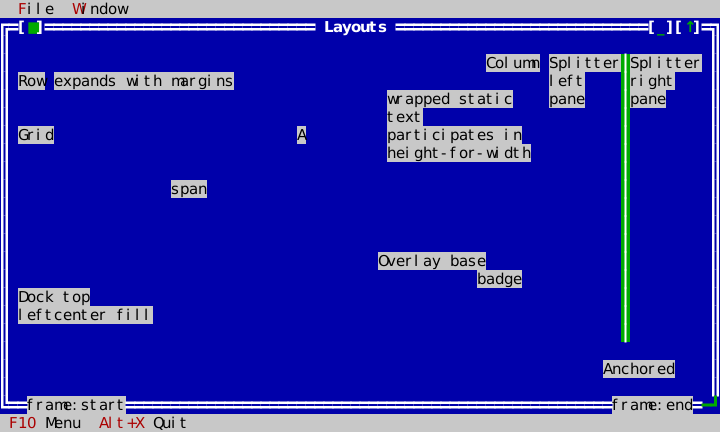
recompute child bounds after a terminal resize. The Layouts example places the
main families in one resizable window.
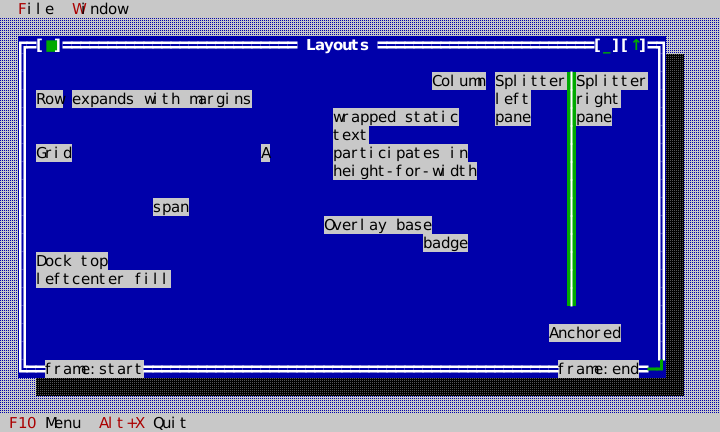
Pick the container from the relationship
| Container | Use when | Key idea |
|---|---|---|
Row / Column | items share a horizontal/vertical band | fixed and expanding items, spacing, alignment, margins |
Grid | controls align in rows and columns | cells can span rows/columns |
Dock | chrome consumes edges around a central body | top/bottom/left/right are carved in order; center fills |
AnchorPane | a child follows selected edges | anchors preserve edge relationships |
Overlay | children stack | fill base plus manual-positioned badges/popups |
Splitter | users must resize two adjacent panes | it owns exactly two panes and handles keyboard/mouse adjustment |
The following source-backed slice creates a Row, Column, and Grid. It is part
of LayoutsApp::build_window, so it compiles as the real example.
// Cross-axis placement is per child: the Row centres its label vertically
// and keeps a one-row margin above its text; the Column right-aligns its
// label and keeps a one-column margin either side of its paragraph.
auto row = std::make_unique<ui::Row>(Rect{1, 1, 30, 3});
row->set_spacing(1);
row_ = row.get();
row->add_item(std::make_unique<widgets::Label>("Row"),
              ui::LayoutSpec{ui::SizePolicy::Fixed, 1, ui::Alignment::Center});
row->add_item(std::make_unique<widgets::StaticText>("expands with margins"),
              ui::LayoutSpec{ui::SizePolicy::Expanding, 1, ui::Alignment::Fill, 1, 0});
pane.add_item(std::move(row), ui::Anchors{true, true, true, false});

auto column = std::make_unique<ui::Column>(Rect{33, 1, 18, 7});
column->set_spacing(1);
column_ = column.get();
column->add_item(std::make_unique<widgets::Label>("Column"),
                 ui::LayoutSpec{ui::SizePolicy::Fixed, 1, ui::Alignment::End});
column->add_item(std::make_unique<widgets::StaticText>("wrapped static text participates in height-for-width"),
                 ui::LayoutSpec{ui::SizePolicy::Expanding, 1, ui::Alignment::Fill, 1, 1});
pane.add_item(std::move(column), ui::Anchors{false, true, true, false});

auto grid = std::make_unique<ui::Grid>(Rect{1, 5, 30, 5}, 2, 3);
grid->set_spacing(1);
grid_ = grid.get();
grid->add_item(std::make_unique<widgets::Label>("Grid"), ui::GridSpec{0, 0, 1, 2});
grid->add_item(std::make_unique<widgets::Label>("A"), ui::GridSpec{0, 2, 1, 1, ui::Alignment::Center});
grid->add_item(std::make_unique<widgets::Label>("span"), ui::GridSpec{1, 0, 1, 3, ui::Alignment::Center});
pane.add_item(std::move(grid), ui::Anchors{true, true, true, false});
Dock, Overlay, Splitter, and anchors complete the same window. Frame overlays
are owned by Window, not painted by the content manually.
auto dock = std::make_unique<ui::Dock>(Rect{1, 11, 30, 5});
dock_ = dock.get();
dock->add_item(std::make_unique<widgets::Label>("Dock top"), ui::DockEdge::Top);
dock->add_item(std::make_unique<widgets::Label>("left"), ui::DockEdge::Left);
dock->add_item(std::make_unique<widgets::StaticText>("center fill"), ui::DockEdge::Center);
pane.add_item(std::move(dock), ui::Anchors{true, false, true, true});

auto overlay = std::make_unique<ui::Overlay>(Rect{33, 9, 18, 5});
overlay_ = overlay.get();
overlay->add_item(std::make_unique<widgets::StaticText>("Overlay base"), ui::OverlayMode::Fill);
auto badge = std::make_unique<widgets::Label>("badge");
badge->set_bounds(Rect{11, 1, 5, 1});
overlay->add_item(std::move(badge), ui::OverlayMode::Manual);
pane.add_item(std::move(overlay), ui::Anchors{false, false, true, true});

auto first = std::make_unique<widgets::StaticText>("Splitter left pane");
auto second = std::make_unique<widgets::StaticText>("Splitter right pane");
auto splitter = std::make_unique<widgets::Splitter>(Rect{52, 1, 17, 13}, std::move(first), std::move(second));
splitter_ = splitter.get();
pane.add_item(std::move(splitter), ui::Anchors{false, true, true, true});

auto anchored = std::make_unique<widgets::Label>("Anchored");
anchored->set_bounds(Rect{58, 15, 8, 1});
anchored_label_ = anchored.get();
pane.add_item(std::move(anchored), ui::Anchors{false, false, true, true});
Width decides height
Wrapped content answers a different height at every width, and Row and
Column pass that question through: each answers height_for_width from what
its children answer at the widths it would give them, so a container holding a
paragraph reports the rows the paragraph really needs. That is what a window
sized from its own content is sized by — a message box, or any window added to
a Desktop without bounds of its own. Such a window opens at the width its
content asks for, widened only as far as it must be for the content to fit the
height available, and centred in what is left.
Grid, Dock, Overlay and AnchorPane do not report intrinsic sizes at
all; give a window built from those an explicit size.
Resizing is part of the design
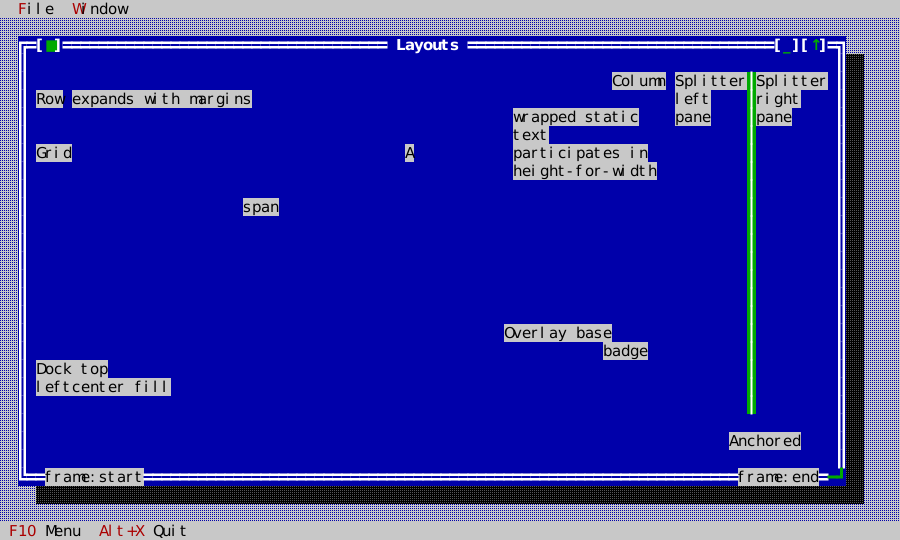
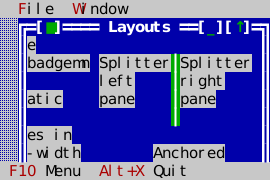
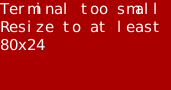
The application is tested at normal, wide, narrow, below-hard-floor, and recovered sizes. The docked chrome stays at the terminal edges; anchored content follows its requested edges; unavailable space degrades to the application's small-terminal indication and recovers cleanly.
Each of those claims is an event script. The Layouts suite resizes the
terminal and presses keys, asserts every container family's child bounds, and
compares each family's region of the frame with a pinned dump (see
Example apps). A resizable dialog
grip-dragged by the mouse keeps its bottom-right-anchored button in the corner
and stretches its all-edges-anchored memo, and two frame overlays follow a
mouse resize while one of them widens
(tests/test_window_resize_golden.cpp). The shrink storm in
tests/test_wp36.cpp goes from 80×24 to 30×8, below full chrome but above
kHardFloorSize, where the window is clamped and still framed; then to 8×4,
where Application::terminal_too_small() holds and only the size to resize to
is drawn; then back to 80×24, pinning all four frames as
tests/golden/shrink_storm_*.dump.
| Wide | Narrow | Below hard floor | Recovered |
|---|---|---|---|
 |  |  |  |
Common choices
- Use
Row/Columnfor ordinary form bands; use aGridwhen labels and fields must align across bands. - Use
AnchorPanefor a small number of independently edge-pinned regions. - Use
Dockfor menu/status/tool areas around a large central document. - Use
Splitterrather than a fixed 50/50 row when the user should control the balance. The File Browser is the reusable master/detail pattern. - Put a small visual badge in
Overlay; use a real Desktop popup/dialog when it needs focus, dismissal, or modality.
See widget gallery for interaction details and object model for ownership.