 CK Core CDE
Editor drop handling
CDE Editor offers three meanings for a file drop:
- Automatic uses desktop type information to select suitable behavior;
- Insert Paths inserts the dropped filenames; and
- Insert Content reads the files into the document.
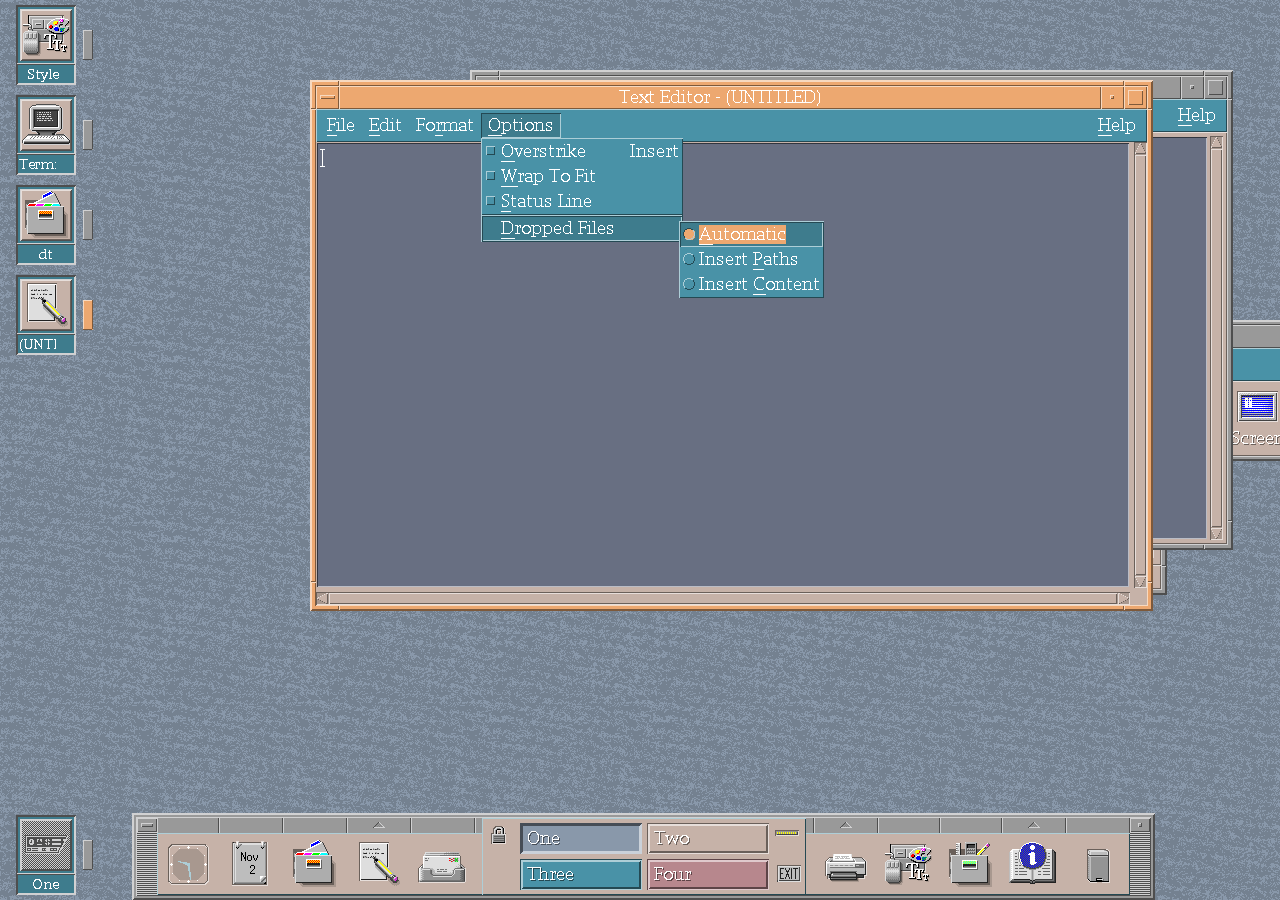
The three dropped-file modes in CDE Text Editor.
The Options → Dropped Files submenu exposes the choice. The selected mode is
saved in ~/.dt/dtpadrc, applied to the editor widget and propagated when an
editor is opened through ToolTalk.
This makes the same drop gesture useful for writing a list of paths as well as combining text files.
Save As starting directory
The Save As dialog starts in the directory of the file being edited, or in the
directory of the last file operation, or in the current directory of the
process. The text that becomes that directory is bounded: a directory that
leaves no room for the dialog's mask is not used, and the current directory is
used instead. The directory of a file name typed in the dialog is taken up to
its last slash, so a long typed path cannot overflow the buffer that holds it.
The logic is in programs/dtpad/dirselect.c, which has no Motif dependency and
is tested on its own by programs/dtpad/tests/check-dirselect.py.
Tabbed documents, recent files, line numbers, and crash-recovery autosave
dtpad also provides optional modern editing conveniences across both Wayland
and X11 sessions while keeping a single-document window completely chrome-free
until a second tab is opened:
- Tabbed documents: File → New Tab (
Ctrl+T), File → Open in New Tab..., File → Close Tab (Ctrl+W),Ctrl+Tab/Ctrl+Shift+Tabtab cycling, and a collapsible top tab bar (+button and per-tab dirty*markers) that appears automatically when two or more documents are open. - Recent files (
~/.dt/dtpad.recent): File → Open Recent tracks the ten most recently opened or saved files in MRU order with atomic0600updates. - Line-number gutter: Options → Show Line Numbers (
Dtpad*showLineNumberspersisted in~/.dt/dtpadrc) toggles a48 pxright-aligned line-number margin drawn with the editor widget'sXmNrenderTableand aligned directly to each wrapped or unwrapped line'sXmTextPosToXYglyph baseline across UTF-8 documents. - Multi-language syntax highlighting: Options → Syntax Highlighting
(
Dtpad*syntaxHighlightingpersisted in~/.dt/dtpadrc, enabled by default) automatically detects file extensions and#!shebangs for C/C++, Shell/Bash, JSON, JavaScript/TypeScript, Python, YAML/TOML/INI, XML/HTML/SVG, CSS, Markdown, Makefile/CMake, Rust/Go, SQL, and Diff/Patch (programs/dtpad/padSyntax.c). Token spans are colored non-destructively via CK Core Motif'sXmTextSetColorSpansAPI with automatic background-luminance adaptation so keywords, strings, comments, numbers, preprocessor directives, and types stay high-contrast on both dark and light CDE palettes. - Crash-recovery autosave (
~/.dt/dtpad-autosave/): Unsaved edits are periodically checkpointed to0600swap files keyed by canonical path and owner PID. Normal Save and clean Close remove the swap file; if the editor or session terminates abruptly (SIGKILL/ power loss), reopening the file restores the unsaved buffer and marks it modified so the user can review and save or discard it. Bothprograms/dtpad/padFeatures.candprograms/dtpad/padSyntax.crun under AddressSanitizer and UndefinedBehaviorSanitizer viaprograms/dtpad/tests/check-pad-features.py.