 CK Core CDE
Window management
CK Core CDE extends dtwm without replacing its workspace, icon or session model.
Task switching
The keyboard task switcher presents the available windows, keeps the current
selection visible and supports pointer hover and pinning. It is enabled by the
Dtwm*showTaskSwitcher resource.
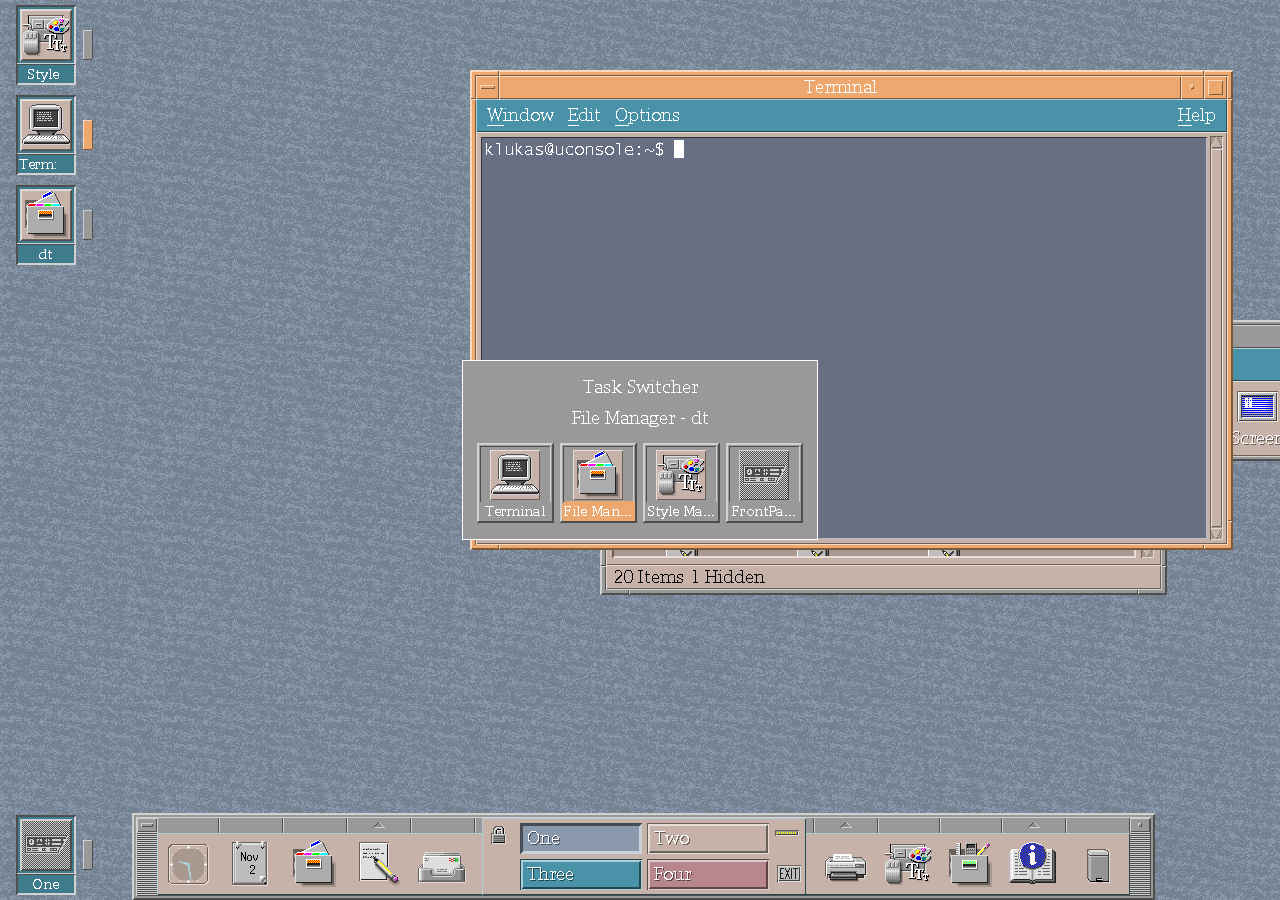
The keyboard task switcher running in dtwm on uConsole.
Movement and focus
- snap feedback previews half-screen and quadrant placement while moving;
Super+Left/Super+Right/Super+Up/Super+Down(f.tile_window left|right|up|down) tiles the active window to halves and quadrants of the usable workarea (honoring the Front Panel strut), maximizes on repeatedSuper+Up, restores the saved pre-tile geometry onSuper+Down, and links shared inner borders between adjacent tiled or edge-snapped windows so dragging the split divider resizes both neighbors together in lockstep while clamping against each window's minimum size on both X11dtwmanddtwm-wayland;- tapping bare
Super, pressingSuper+Tab/Super+W(f.toggle_overview), or performing a three-finger touchpad swipe-up ondtwm-waylandopens a live spatial workspace and window overview displaying clickable CDE workspace pills and scaled real-time window thumbnails (Super+SpaceandAlt+F2remain bound tock-launch, or setDTWM_SUPER_ACTION=launcherfor bare-Superlauncher activation); - holding Shift aligns movement and resize to the desktop grid;
- double-clicking a title bar maximizes or restores the window;
- clicking the desktop clears the active-window focus;
- clicking a Front Panel or subpanel item whose application is already open
moves or switches to the window as needed, restores it if minimized, raises
it to the foreground, and grants active keyboard focus on both X11
dtwmand Wayland (dtwm-wayland); and - Style Manager → Window configures Minimize / Restore Animation
(
Dtwm*minimizeAnimation), Maximize / Restore Animation (Dtwm*maximizeAnimation), and Animation Speed (Dtwm*animationSpeed:Very Quick,Standard[default], andSlow) dynamically for the active backend — offeringNone,Wireframe(minimize default), andTitlebaron X11dtwm(maximize defaultNone), andNone,Bevel Morph/Bevel Glide(default, with late symmetric near-icon crossfade),Titlebar Shuttle, andWireframeon Wayland (dtwm-wayland).
Open-window desktop icons and the optional Icon Box (Dtwm*useIconBox: True) keep running applications in invariant mental-map order across minimize,
restore, maximize, and focus changes on both X11 and Wayland. Desktop icons can
be dragged freely to any unoccupied placement-grid cell with a visual grid and
4-pixel rounded slot highlight (f.pack_icons / Clean Up Icons packs
manually placed icons back in sequence), while closing a window compacts
auto-placed icons cleanly and Icon Box resize or maximize/restore reflows rows
and columns without scrambling icon order.
Hardware keys, 3D bevel OSD and touchpad gestures
Both dtwm on X11 and dtwm-wayland on Wayland bind standard laptop and
workstation hardware keys without stealing keyboard focus from the active
application:
XF86AudioRaiseVolume,XF86AudioLowerVolume,XF86AudioMute, andXF86AudioMicMuteadjust output volume and microphone mute viadtwm-media-ctl(PipeWirewpctl, PulseAudiopactl, or ALSAlibasound) and display a non-focus-stealing336×843D-beveled CDE OSD gauge;XF86MonBrightnessUp,XF86MonBrightnessDown,XF86KbdBrightnessUp, andXF86KbdBrightnessDownadjust/sys/class/backlightand keyboard LEDs (withorg.freedesktop.login1.Session.SetBrightnessfallback, a 5% minimum display brightness floor, and~/.dt/backlight.confpersistence restored on session startup);XF86AudioPlay,XF86AudioPause,XF86AudioNext,XF86AudioPrev, andXF86AudioStopdispatch MPRIS (org.mpris.MediaPlayer2.Player) transport commands; andPrintlaunchesck-grab, whileSuper+Linvokesdtaction LockDisplay.
Three-finger horizontal touchpad swipes (wlr_pointer_gestures_v1 on Wayland
and XInput 2.4 XI_GestureSwipe* / _DT_WM_SWIPE on X11) switch to the next or
previous CDE workspace, while dtstyle's Mouse dialog provides a
Touchpad section controlling tap-to-click, natural scrolling, two-finger
right-click, disable-while-typing, and disable-with-external-mouse across both
libinput (Wayland) and XInput2 (X11).