 CK Core CDE
File Manager improvements
An optional native folder comparison window opens from
File → Synchronize Folders... when CDE is built with --with-ck-core-fs
and installed ck-core-fs-lib 0.3 or newer. It provides paged comparison, metadata
assessment, byte/date filters, scoped matching-rule review and saved named
preferences. Apply remains compile-time disabled: operation choices preview a
plan, and mirror/two-way execution is not delivered.
The ordinary Copy to... and Move to... commands still perform file operations through the existing helper. They are separate from the new window's read-only Copy/Update plan modes. The design and delivery status documents the remaining execution and reconciliation requirements.
Folder-operation feedback distinguishes completed, partial, failed and cancelled work. Cancellation or an explicit overwrite skip blocks deletion of a move's source. Cancellation reports that it is settling, then leaves the final result visible; only successful completion can close the progress window automatically.
File-copy transfers complete each input block even when the operating system accepts only part of a write. Interrupted reads and writes are retried; a zero-byte write is reported as an I/O error. The first transfer error is retained while both descriptors are closed, and delayed close failures are reported before the copy is accepted. The transfer regression injects these conditions into the production copy routines and checks copied bytes and source preservation. The regular-file fallback used directly by File Manager follows the same completion rule: a failed destination close blocks source removal during a cross-filesystem move, including when no error-dialog callback is installed. Dropped or pasted buffers are written completely before success is sent to the parent window. Invalid lengths, missing nonempty data, zero-progress writes and delayed close failures report an error; an empty buffer creates an empty file. New targets are created exclusively. An unexpected existing file or symbolic link is rejected rather than overwritten; approved buffer replacement removes the old target through the existing conflict workflow before creation. For multi-file operations, a later successful item does not erase an earlier transfer or preflight failure in the result returned to the parent window. Dismissing a subsequent conflict dialog likewise retains an earlier failure. A desktop drop whose source cannot be resolved reports that error and skips that item instead of passing a missing source into the transfer routine. Failed transfers attempt to remove their newly created incomplete destination; cleanup failure can leave it in place. These legacy operations do not provide crash recovery or transactional replacement.
An ignored copy error is tracked separately from successful completion. Cross-filesystem moves retain their source if any file or recursive child was not copied completely, even when the user chooses to ignore the error.
Recursive copy and delete operations allocate complete child paths instead of appending names to fixed buffers. Cross-filesystem moves likewise check the complete source parent. Directory iteration retries interruption and reports other read and close errors. Symbolic-link copies grow their read buffer when it fills, preserving the complete link target. The filesystem regression covers deep fixture paths longer than 1024 bytes, directory errors and link growth.
Directory refresh also validates the complete worker message and bounds file
names, relative symbolic-link expansion, data types and action labels before
encoding them for the browser. An oversized or incomplete entry is rejected as
one failed refresh response, so it cannot install partial metadata or overwrite
a fixed buffer. If account lookup is temporarily unavailable, icon-position
storage uses the numeric user ID instead of dereferencing a missing account.
Refresh-time child paths and cached modified-subdirectory paths use the same
bounded join. Attribute view also bounds owner, group and symbolic-link display
text and shows a placeholder if an unusual timestamp cannot be converted,
rather than allowing account data or formatting failures to corrupt the row.
A disconnected background worker is removed from the refresh pool and both
pipe descriptors are closed before it can be replaced. A failed worker launch
releases the new pipes and leaves the request queued for a later refresh.
Copy, move and link dialogs compose their selected-object captions as Motif
strings, so a translated caption or long object name is not copied through a
fixed text buffer. Their destination and preview paths are joined with explicit
capacity checks; an oversized resolved path is rejected before an operation is
started instead of being truncated or copied past the target buffer.
The final host, parent directory and leaf split is also transactional. It uses
the source directory—not uninitialized destination storage—to decide how to
join a relative name, preserves the root parent for /name, and reports an
invalid or oversized target before file creation or transfer setup begins.
Workspace icons affected by a completed move follow the same bounded path
rules. Overlong or malformed refresh paths are ignored without changing the
completed file operation, parent-directory matching observes component
boundaries, and refreshed desktop metadata replaces its owned optional strings
without duplicate allocation or null-string copies.
Conflict review cancellation is a terminal non-success outcome: work completed
before cancellation remains in place, but the operation is not reported as
successfully complete. When several conflict rows fail while the worker drains
the batch, the first failure remains the operation result; later transfer,
rollback, cleanup or protocol failures cannot hide its original cause.
Background operation control messages are also written completely, with
interrupted and partial writes handled and a closed reader reported without a
fatal SIGPIPE. If the parent channel is lost before a modification notice,
the worker stops before changing that item; if final status cannot be
published, the worker exits unsuccessfully instead of claiming completion.
CK Core CDE develops File Manager as a visual workspace rather than only a directory browser.
Shelf and path interaction
The shelf keeps frequently used files and directories close to the current view. Shelf items support opening, running, rearranging and file operations. IconicPath entries expose the same popup interaction expected from other path components.
The initial shelf frame uses a deterministic small-icon placeholder until the dialog's saved view data is available. Applying the real view then rebuilds the shelf at its selected icon size; startup never reads an uninitialized view.
Richer views
- supported image files can render their own content as icons;
- extra-large presentation and additional Icon Editor zoom levels are available;
- icon and shelf layouts account for labels and center their content; and
- a Storage Size dialog reports detailed use for a selected object, counting
apparent byte size across every regular filename while deduplicating physical
disk blocks (
st_blocks * 512) per unique(st_dev, st_ino)inode and reporting unique hardlinked inodes alongside their additional directory names (Hardlinked files: N (M additional names)).
Path input resolution (_DtPathFromInput) expands $VAR and ${VAR}
environment references directly in process without invoking /bin/sh, and
parent-directory (_DtPName), path-join (_DtBuildPath) and symbolic-link
resolution (_DtFollowLink, _DtResolveAppManPath) enforce MAXPATHLEN
bounds and handle relative links without directory separators.
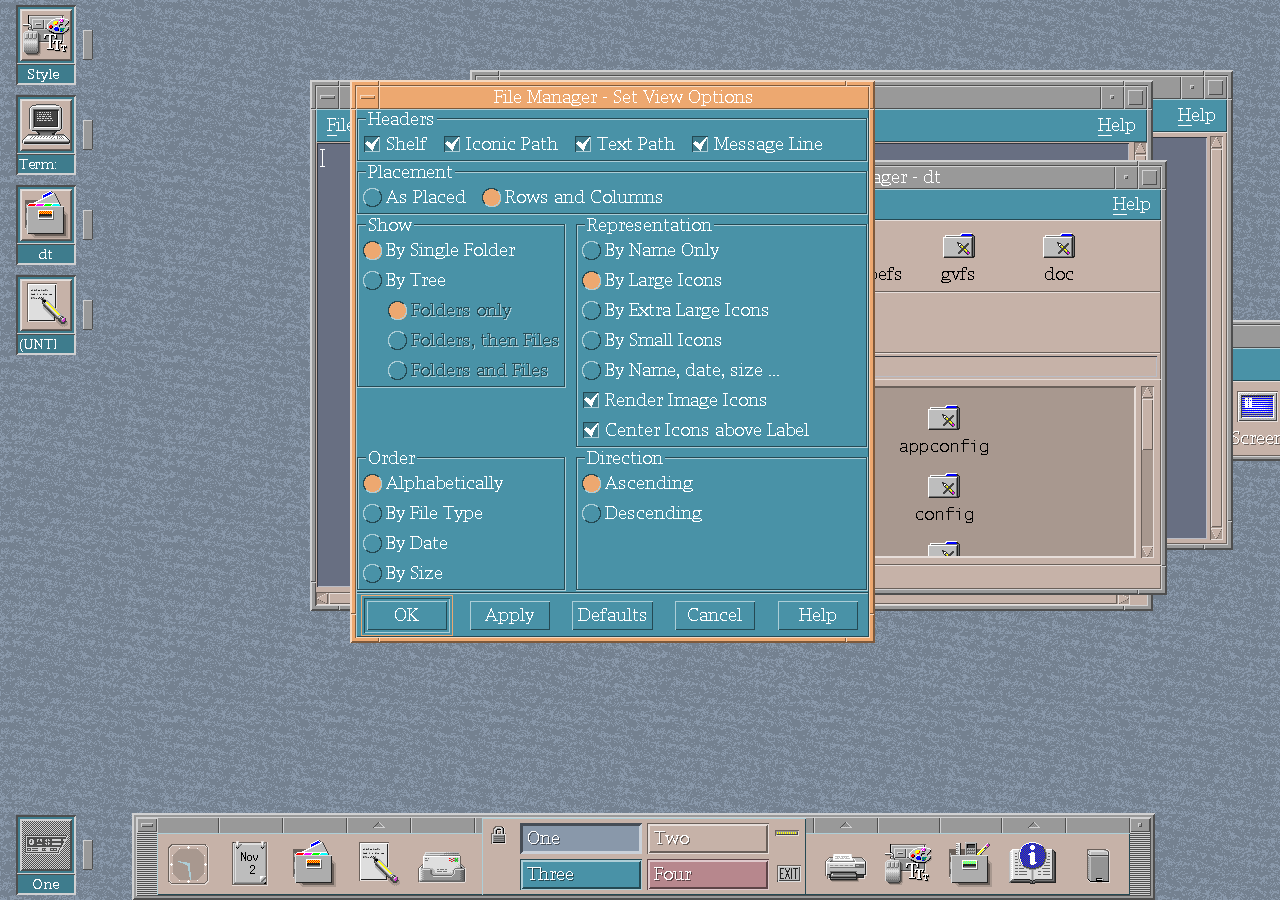
File Manager exposes the new view controls together in Set View Options.
File actions also accept filenames containing quotes and backslashes.
XDG MIME associations, dtopen, and Open With... (WP-12)
- Interactive Open With... dialog (
OpenWith.c): Selecting one or more files and choosing Selected → Open With... or right-clicking a file and choosing Open With... detects the target file's MIME type (magic-header inspection plus extension/XDG lookup), ranks compatible XDG.desktophandlers ahead of general applications, previews or edits the expanded command line, and optionally persists the user's choice to~/.config/mimeapps.list([Default Applications]and[Added Associations]). - Modernized
dtopenand datatypes:dtopen(dtopen_image,dtopen_pdf,dtopen_ps,dtopen_video,dtopen_audio,dtopen_office,dtopen_any) consultsdtappintegrate-xdg --open-mime(~/.config/mimeapps.list) first, then modern Linux viewers (papers,evince,okular,loupe,eog,mpv,vlc,libreoffice,ck-browser), and finallyxdg-open. Built-in CDE datatypes (datatypes.dt) includeWEBP,SVG,VIDEO_MODERN(.mp4,.mkv,.webm),AUDIO_MODERN(.mp3,.flac,.ogg,.opus,.m4a), andOFFICE_DOC(.odt,.ods,.odp,.docx,.xlsx,.pptx).
Removable media (UDisks2), network shares (GVFS), built-in archives, shared thumbnails, live XDG Trash, and FileManager1 (WP-16)
dtfile shares a unified removable-device, network-mount, archive, thumbnail,
trash, and session D-Bus layer across both CDE (Wayland) and CDE (X11 / XLibre):
- Removable USB/SD & encrypted LUKS volumes (
Devices.c): Subscribes toorg.freedesktop.UDisks2(ObjectManager+ liveInterfacesAdded,InterfacesRemoved, andPropertiesChangedsignals), dynamically surfacing hotplugged USB/SD/MMC drives and encryptedcrypto_LUKSvolumes indtfile's Shelf, File → Connected Mounts & Devices..., File → Go To... (Connected Mounts & Shares tab), and View → Mounts & Devices.... Activating a locked LUKS volume opens a Motif passphrase dialog (Encrypted.Unlockfollowed byFilesystem.Mount, zeroing passphrase buffers immediately after marshalling), and right-clicking or using Connected Mounts & Devices... supports Unmount and safe Eject / Power Off Drive (Filesystem.Unmount,Encrypted.Lock,Drive.Eject, andDrive.PowerOff). - Network shares (
smb://,sftp://,davs://,webdavs://,nfs://), SSH config remotes, user-spacesshfsfallback & MTP/PTP mobile devices (GVFS): File → Connect to Server... mountssmb://,sftp://,davs://,webdavs://(normalized automatically todavs://), andnfs://shares viagio mount(fork/execvp, never/bin/sh), and falls back automatically to user-spacesshfsunder~/.dt/mounts(0700, with one-clickfusermount3 -udisconnect) whengvfsd/giois unavailable orDTFILE_PREFER_SSHFS=1is set. Selecting SSH / SFTP (sftp://) parses~/.ssh/config(includingIncludedirectives and/etc/ssh/ssh_config, skipping wildcard patterns) and presents a Configured SSH Remotes (~/.ssh/config) list so known aliases populate the host, username, andsftp://URI (preserving OpenSSHHostName,Port,IdentityFile, andProxyJumpsettings). During connection attempts, a dedicated Connecting to Remote Server progress dialog displays a 3D CDE progress bar, elapsed timer, and Cancel button (SIGTERM), and failed connections post a modal Connect to Server Error dialog with the attempted URI andgio mountdiagnostics./run/user/$UID/gvfsis watched viainotifyso remote shares and hotplugged MTP/PTP phones appear automatically with one-click Disconnect / Unmount (gio mount -u). - Tabbed Go To... navigation (
ChangeDir.c,XmTabStack): File → Go To... provides a two-tab MotifXmTabStack(Folder History and Connected Mounts & Shares), allowing users to browse visited folders or immediately inspect, mount/unlock, disconnect, or open any connected GVFS share, MTP phone, removable/LUKS volume, or local filesystem. - Built-in archive actions & Zip-Slip defense (
Archive.c): Selected and right-click object popup menus provide Extract Here, Extract To..., and Compress... supporting.zip,.tar.gz/.tgz,.tar.xz/.txz,.tar.zst/.tzst,.tar.bz2,.tar, and.7zvialibarchive(preserving UTF-8 filenames via thread-scopedC.UTF-8uselocale()). Extraction validates every archive entry in a preflight pass—rejecting absolute paths,..traversal, NUL/control bytes, device/FIFO special nodes, and symlink or hardlink target escapes—and materializes entries into a sibling staging directory strictly via descriptor-relativeopenat/mkdirat/symlinkat/linkatwithO_NOFOLLOW. - Shared FreeDesktop thumbnails (
Thumbnails.c): WhenrenderImageIconsis enabled (Dtfile*renderImageIcons: True),dtfileresolves cached PNG previews from$XDG_CACHE_HOME/thumbnails/{large,normal}/<md5(URI)>.png(checking both GLibg_filename_to_uriand strict RFC-3986file://URI encodings and validatingThumb::MTime/ mtime freshness) for PDFs, videos, SVGs, WebP, and office documents, alongside direct.pngpreviews loaded vialibXm.so.9. - Live bidirectional XDG Trash & per-mount
.Trash-$UID(XdgTrashSync.c): Watches$XDG_DATA_HOME/Trash/{files,info},~/.dt/Trash, and active<mount>/.Trash-$UID/{files,info}directories viainotify, synchronizing items trashed or restored by external GTK/Qt/CLI applications live and non-destructively in both directions while trashing files on external USB/SD mounts inO(1)on the same filesystem (<mount>/.Trash-$UID). org.freedesktop.FileManager1D-Bus service (FileManagerService.c): Registersorg.freedesktop.FileManager1on/org/freedesktop/FileManager1(with/usr/share/dbus-1/services/org.freedesktop.FileManager1.serviceauto-activation), implementingShowFolders,ShowItems(raising/activating the targetdtfilewindow and highlighting the requested files),ShowItemProperties(opening CDE's Permissions/Properties dialog), andHostname.
Browser ergonomics: tabs, live search, file clipboard, and session undo (WP-17)
dtfile supports everyday keyboard- and pointer-driven browser ergonomics across
both CDE (Wayland) and CDE (X11 / XLibre) while preserving classic single-tab
appearance when only one tab is open:
- Multi-tab browsing & navigation shortcuts (
BrowserErgonomics.c): PressCtrl+T(File → New Tab), middle-click (Button2click without drag) a folder icon, or choose Open in New Tab from a folder's right-click menu to open up to 16 tabs per window. The tab strip appears automatically whenever two or more tabs are open, providing</>Back/Forward buttons, active-tab highlighting, per-tabxclose buttons, and a+new-tab button. Cycle tabs withCtrl+Tab/Ctrl+Page_DownandCtrl+Shift+Tab/Ctrl+Page_Up, close the active tab withCtrl+W(File → Close Tab), step through each tab's 64-entry navigation history withAlt+Left/Button8andAlt+Right/Button9, ascend to the parent folder withAlt+Up, start inline fast-rename withF2, and toggle dot-files withCtrl+H. - Asynchronous in-window search (
Ctrl+F) & classic File → Find... (Find.c) backed byck-core-fs-lib: PressCtrl+F(File → Search in Window...) to open the collapsible two-row search bar without leaving the active window, or open File → Find... for the classic multi-window Find dialog. When built with--with-ck-core-fs, both search surfaces run onck-core-fs-lib's cancellableckfes_*worker (ck_fs_search.h) without invoking/bin/sh,find, orgrep, filtering by filename substring or glob (*,?), regular-file text content (skipping NUL-containing binary files), optional subfolder recursion and case matching, minimum/maximum byte sizes (K/M/Gsuffixes supported), andYYYY-MM-DDmodified-date bounds. Matches stream live into the results list with Open, Open in New Tab, Reveal in Folder (navigating to the matched entry's parent folder and scrolling/selecting the icon), Stop, andEscapedismissal. - Cross-toolkit file clipboard (
Ctrl+C/Ctrl+X/Ctrl+V): Selected → Cut / Copy / Paste andCtrl+X/Ctrl+C/Ctrl+V(outside text fields) publish and consumex-special/gnome-copied-files,text/uri-list(RFC-3986file://URIs), andUTF8_STRINGpaths onCLIPBOARD, interoperating betweendtfilewindows and native Wayland (wl_data_device/zwlr_data_control_v1) or X11 GTK/Qt peers. Pasting copied items into their source directory creates non-destructive<stem> (copy)<ext>duplicates. - Bounded per-session undo journal (
Ctrl+Z): Selected → Undo (Ctrl+Z) maintains a 64-entry per-session undo stack reversing Rename, Move, Copy (moving newly created copies into XDG Trash rather than unlinking permanently), and Put in Trash (restoring items and removing companion.trashinforecords). - Wayland/Xdnd folder and Shelf drag-and-drop safety (
File.c,FileMgr.c,DndDrag.c): Dragging folder or file icons onto Shelf slots (either to pin a shortcut into an empty Shelf slot or move/copy into a pinned directory) or reordering Shelf slots on Wayland and X11 resolvesXtDisplayOfObjectcleanly onDtIconGadgetdrag initiators, uses 64-bit-safeWindowoutputs inXGetGeometry, answers eager compositorXdndSelectionTARGETSprobes with exact 64-bitAtomelement counts without prematurely consuming one-shotDtCR_DND_CONVERT_DATAstate, and queriesXtGetSelectionRequestagainst the owning shell and active selection atom.
The desktop gallery shows File Manager browsing the staged CDE installation.