 CK Core CDE
Trash improvements
CK Core CDE records original paths, deletion dates and sizes for trashed objects, and can import entries from the freedesktop.org Trash layout. File operations use secure temporary files and handle longer paths more reliably.
Metadata rewrites use a unique file beside .trashinfo, with owner-only access.
The writer checks entry writes, flushing, file synchronization and closing before
atomically renaming the replacement over the previous metadata. A failed rewrite
preserves the previous file and removes its temporary replacement. Staging beside
the destination also permits Trash to reside on a separate mounted filesystem.
Existing metadata opened by the Trash reader is restricted to owner-only access.
The reader consumes the stored byte lengths rather than splitting filenames at
line boundaries. Spaces and newlines in names therefore remain part of their
fields. Negative, overflowing or truncated lengths, embedded NULs, invalid size
attributes and internal names that escape the Trash directory are rejected.
Deletion dates and sizes are parsed as separate attributes. A read error or
malformed record disables Trash initialization and preserves the previous
metadata, rather than rewriting a partially loaded list. Missing files are
discarded only for ENOENT; other lookup failures preserve the metadata.
The standalone TrashMetadata module has no Xt or Motif dependency. Its C
regression exercises malformed records and complete records, including multiple
records with embedded newlines and the largest unsigned stored size.
The regression in cde/programs/dtfile/tests/check-trash-writer.py executes the
production writer with real files and injects failures in creation, stream setup,
permissions, ownership, entry writing, flushing, synchronization, closing and
replacement. These checks run at the shared repair-batch validation checkpoint.
Reading freedesktop Trash information
Before importing an external payload, File Manager reads its complete
.trashinfo record, including stream errors and close failure. Invalid records
leave both the external payload and its information file untouched. The reader
requires the [Trash Info] header, a nonempty native path and a valid local
YYYY-MM-DDThh:mm:ss deletion date. It preserves the first occurrence of each
field and ignores later duplicates, as required by the
freedesktop Trash specification.
Formatting spaces around the equals sign are ignored before decoding; encoded
spaces remain filename bytes. URL escapes preserve filename bytes, including
encoded newlines and literal percent signs. Malformed escapes and encoded NUL
bytes are rejected. Relative
paths resolve against the parent of the external Trash directory, rather than
File Manager's working directory; relative .. components are rejected after
decoding. Complete final lines without a newline and CRLF files are accepted.
To bound memory and scanning, lines and resolved paths are limited to 64 KiB,
and the complete information file to 1 MiB. Oversized input fails as a whole;
its initial fragment is never accepted as a restore path. The desktop adapter
accepts only regular information files and rejects a final symbolic link; a FIFO
is opened nonblocking and rejected before reading.
The standalone XdgTrashInfo parser owns its result strings with malloc and
free; the desktop adapter checks closing before copying a complete result
into Xt-owned storage. Failed reads and allocations return an empty result.
Import currently uses the default home Trash location. These input checks do not make payload migration and CDE metadata publication a crash-recoverable transaction; that remains a separate limitation of the import workflow.
Restoring to a selected destination
Dragging an object out of Trash keeps its selected destination through overwrite confirmation. The dialog owns the exact source and target captured by the worker; it does not rebuild the target from the object's former Put Back location. Cancel or closing the dialog leaves the objects in place. A failed worker admission keeps the confirmation available for retry. The warning also provides the window manager's Close action, equivalent to Cancel.
Confirmed replacement runs in the background worker. A missing source, an unusable parent directory, overlapping objects or failed erasure blocks the move. Replacement failure preserves the source in Trash. A complete successful move is required before the parent removes that object's stored mapping. This legacy replacement operation uses pathnames; it does not provide a held filesystem identity or transactional rollback if replacement is interrupted.
Worker completion includes one result per requested object. Truncated results, unknown statuses and malformed or mismatched conflict records are rejected as a whole; an unread result is never treated as a successful restore. Recursive replacement checks allocate complete child paths and propagate directory-read and close failures.
ToolTalk file-list parsing reports failure to its callers, including batched requests. A failed list is released as a whole and the request is rejected; File Manager does not report an empty successful operation after losing an entry to an allocation or message-read error. Each batch member is processed, including messages that specify a file without additional arguments.
The desktop icon reflects whether Trash contains items. Trash actions can also raise and focus the existing Trash window instead of opening a competing view.
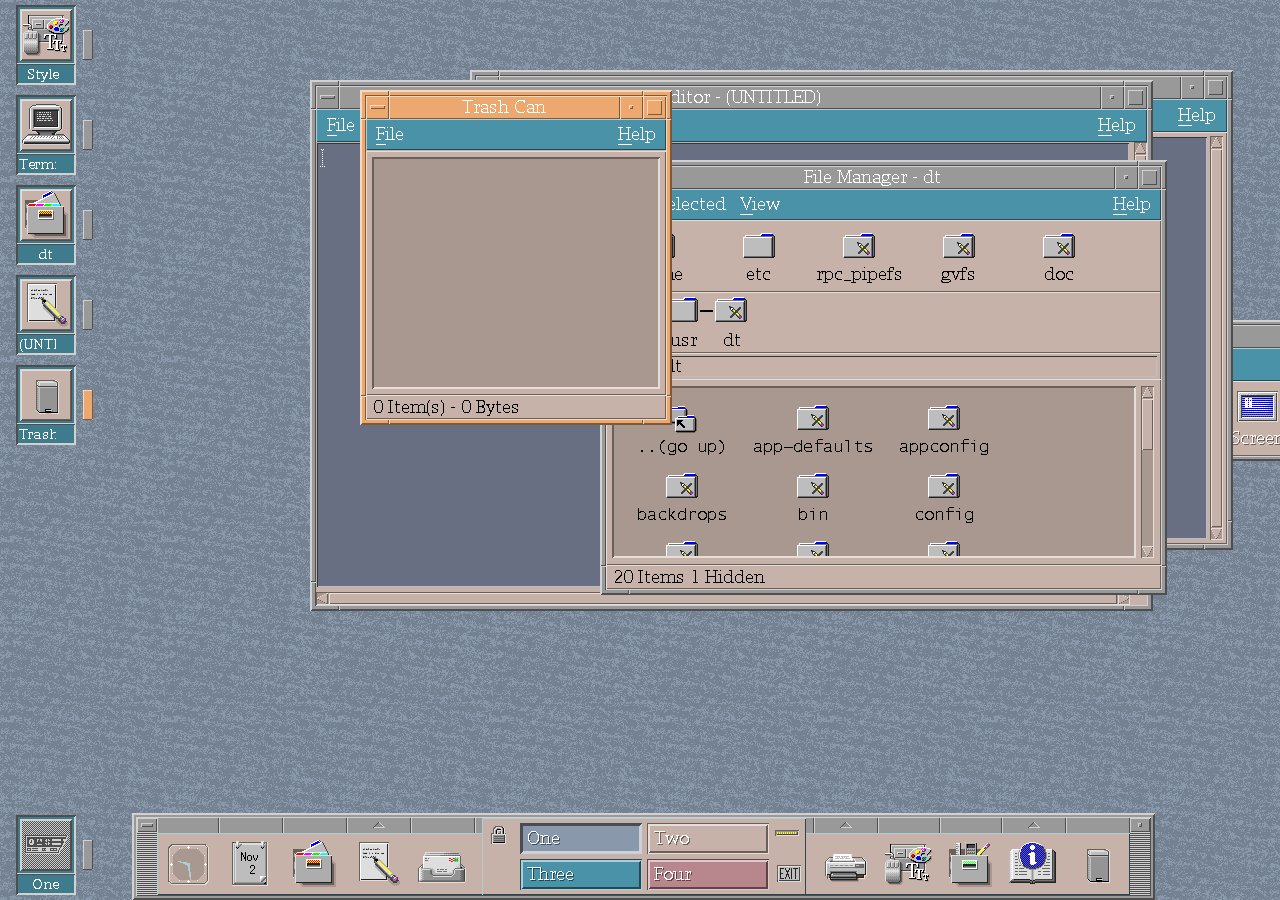
The managed Trash view and its workspace icon in the uConsole session.
Together these changes make the desktop indicator, window and stored metadata describe the same Trash state.