 CK Core Apps
Mines (ck-mines)
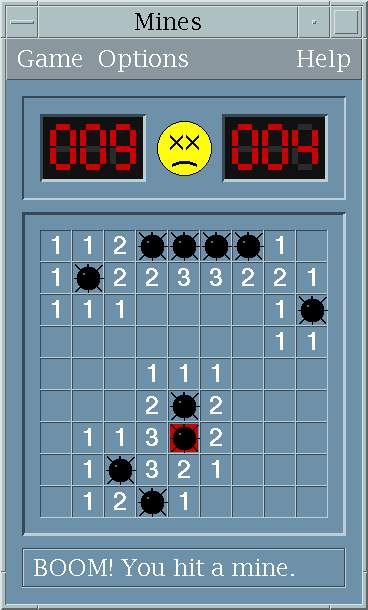
ck-mines (ck-mines X application class, window title Mines) is a native Motif/CDE Minesweeper implementation featuring custom seven-segment mine and elapsed-time LED counters, an interactive smiley reset button, guaranteed safe first click, two-button chording, DPI-aware board scaling, and a persistent high-score table.
Difficulty presets and board scaling
Select a preset from the Game menu or adjust board scale under Options:
| Preset | Grid (cols × rows) | Mines |
|---|---|---|
| Game → Beginner | 9 × 9 | 10 |
| Game → Intermediate | 16 × 16 | 40 |
| Game → Expert | 30 × 16 | 99 |
- Options → Enable Question Marks: Cycles right-click cell marks through
Flag → ? → Clearinstead ofFlag ↔ Clear. - Options → Default Size / Large Size: Selects
1×or2×board rendering on top of automatic X11 screen-DPI scaling (1.0–4.0).
Mouse controls
- Left-click (
Button1): Reveals a covered cell (flood-filling zero-mine regions). Mines are placed on the first click so the opening move is never a mine. - Right-click (
Button3): Places or removes a mine flag (and optional?mark). - Chording (
Button1 + Button3): Releasing while pressing both buttons on a revealed number cell whose adjacent flags match its count reveals all remaining unflagged neighbors at once. - Smiley button: Starts a fresh board at the current difficulty.
Configuration and fastest times
- Fastest Mine Sweepers: Winning Beginner, Intermediate, or Expert in record time prompts for a player name; inspect or clear records at any time from Game → Fastest Mine Sweepers....
- Configuration file:
$XDG_CONFIG_HOME/ck-core/ck-mines.conf(default~/.config/ck-core/ck-mines.conf, with legacy fallback~/.ck-minesrc) storesdiff,cols(8–60),rows(8–40),mines,marks,large_scale, and the best times and player names for each preset. (Settingdiff=3inck-mines.confalso loads customcols,rows, andminesdimensions.)
Environment variables
| Variable | Effect |
|---|---|
CK_MINES_SCALE | Float (0.5–4.0) overriding automatic X11 DPI cell scaling. |
CK_MINES_BACKBUF | Non-empty value enables offscreen X11 Pixmap double-buffering for board redraws. |
CK_MINES_DEBUG | Verbosity level 0–3 (default 1; set 0 to silence [ck-mines] diagnostic lines on stderr). |