 CK Core Apps
Calculator (ck-calc)
ck-calc (CkCalc X application class) is a native Motif/CDE desktop calculator providing both a classic Basic immediate-execution keypad and a Scientific expression-evaluation layout, styled automatically from the active CDE color palette.
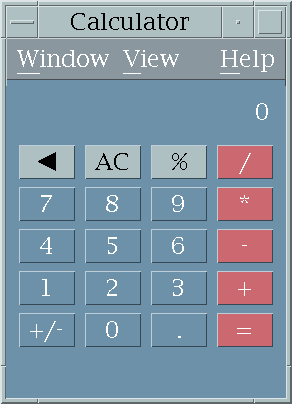
Modes and layout
Switch modes from View → Basic or View → Scientific:
| Mode | Grid | Evaluation model | Window width |
|---|---|---|---|
| Basic | 4 × 5 | Immediate arithmetic (+, -, *, /, %, +/-) | 280 px |
| Scientific | 10 × 5 | Parenthesized formula evaluator with memory, powers, roots, logarithms, factorials, constants, and trigonometry | 640 px |
- Palette integration: Operator buttons (
/,*,-,+,=) and top utility keys (<,AC,%) read the active CDEColorObjcolor sets (src/shared/cde_palette.c) so keypad contrast tracks the current CDE Style Manager palette. - Thousands separators: Toggle View → Show thousands separators to group integer digits according to the active locale.
- Angle units (Scientific mode): An indicator bar beneath the display highlights the active unit (
Rad,Deg,Grad, orTurn), cycled with the keypad's angle button. - Shift /
2ndfunctions (Scientific mode): Toggle the2ndkey—or holdShifton the keyboard—to switch trigonometric and logarithmic keys to their inverse/alternate forms (sin⁻¹,cos⁻¹,tan⁻¹,sinh⁻¹,cosh⁻¹,tanh⁻¹).
Menus and clipboard
| Menu / Control | Action | Shortcut |
|---|---|---|
| Window → New | Spawn an independent ck-calc window | Ctrl+N |
| Window → Close | Save view/session state and close the window | Alt+F4 |
| View → Show thousands separators | Toggle grouped digit formatting | — |
| View → Basic / Scientific | Switch keypad layout and evaluation mode | — |
| Help → About | Open the tabbed About dialog | — |
Display right-click (Button3) | Open popup menu with Copy and Paste (flashes COPIED / PASTED briefly) | — |
Keyboard input
ck-calc routes keyboard events through an internal focus proxy so numeric entry works regardless of which button last had focus:
- Digits:
0–9and numeric keypadKP_0–KP_9(including un-NumLocked keypad navigation keys). - Operators:
+,-,*,/,%(and keypad equivalents). - Decimal separator: Locale decimal character (
.or,) andKP_Decimal. - Evaluate:
=,Return, orKP_Enter. - Backspace:
BackSpace,Delete, orKP_Delete(<). - All Clear (
AC):AorC(case-insensitive). - Temporary
2ndmodifier: HoldShift_LorShift_Rin Scientific mode.
Note
Because C triggers AC (All Clear) for classic desk-calculator typing, use the display's right-click context menu for Copy and Paste rather than Ctrl+C.
Command-line options and persistence
ck-calc [-session <session_id>] [Xt options...]
- User preferences: Stored in
$XDG_CONFIG_HOME/ck-core/ck-calc.view(default~/.config/ck-core/ck-calc.view), recordingshow_thousands,mode, andtrig_mode. - CDE session state: Responds to
WM_SAVE_YOURSELFviaDtSessionSavePath/DtSessionRestorePath(src/shared/session_utils.c), saving window position (x,y,w,h), the currentdisplayvalue,show_thousands,mode, andtrig_mode.
Current limitations
- Sign toggle (
+/-) and percent (%) operate in Basic mode only; in Scientific mode use unary-and explicit division in expressions. - Window dimensions are fixed to each mode's keypad metrics (maximize and manual resize decorations are disabled).