 CK Core Apps
Character Map (ck-character-map)
ck-character-map (CkCharacterMap X application class) browses server-side X11 core (XLFD) fonts and aliases, previews word-wrapped sample text, inspects glyph ranges and font path files, and copies selected characters to the X11/Motif clipboard.
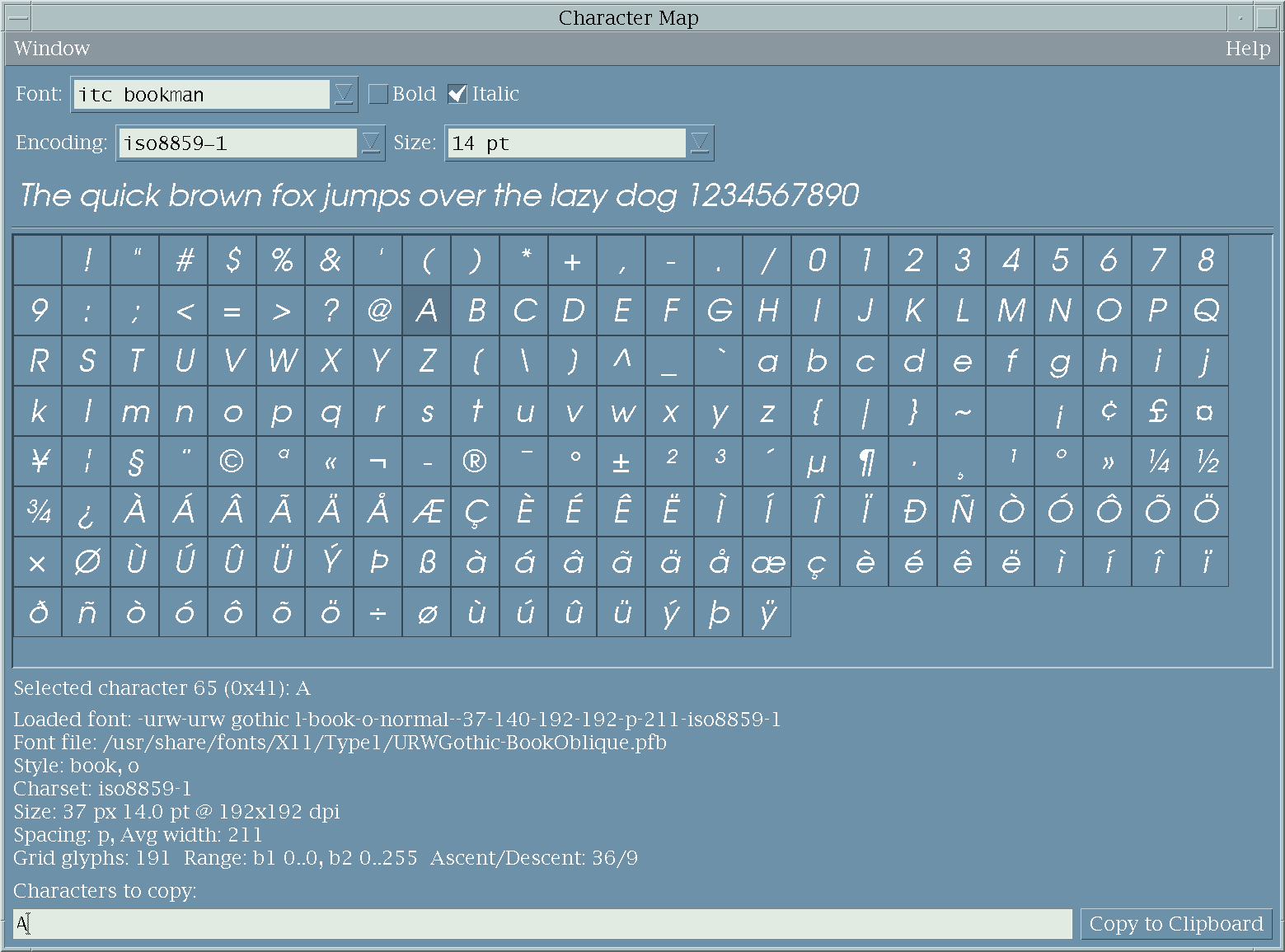
Interface overview
- Font & style bar:
- Font: Groups discovered X11 fonts by XLFD
foundry|family(plus font aliases). - Bold / Italic: Toggle buttons that automatically enable or disable according to the styles available in the selected font family and encoding.
- Encoding: Filters available character encodings for the chosen family (defaulting to
iso10646-1when present). - Size: Lists discrete bitmap pixel sizes or scalable point sizes (
8–72 pt, computed from screen DPI).
- Font: Groups discovered X11 fonts by XLFD
- Sample text preview:
- Renders word-wrapped sample text using the currently loaded X11 font.
- Click anywhere inside the preview box to open the Sample Text prompt dialog (
OK,Cancel, orDefaultto restore"The quick brown fox jumps over the lazy dog 1234567890").
- Scrollable glyph grid:
- Displays all populated 1-byte or 2-byte glyphs in the loaded font and automatically reflows its column count when the window is resized.
- Clicking any cell highlights the glyph, displays its decimal and hexadecimal code point (
Selected character <code> (0x<HEX>)), and appends the character to Characters to copy.
- Font metadata & clipboard panel:
- Displays clickable metadata rows (
Loaded font,Font fileresolved fromfonts.dir/fonts.scale/fonts.aliasalongXGetFontPath,Style,Charset,Size,Spacing, and glyph/ascent/descent metrics). Clicking any metadata line copies that property value into the text field. - Copy to Clipboard publishes the accumulated text in both
UTF8_STRINGandSTRINGclipboard formats viaXmClipboardCopy.
- Displays clickable metadata rows (
Menus and shortcuts
| Action | Shortcut |
|---|---|
| Window → New (open a second Character Map window) | Ctrl+N |
| Window → Close | Alt+F4 |
| Help → About | — |
Command-line options and session state
ck-character-map [-session <session_id>] [Xt options...]
- CDE session state: Saves and restores window geometry (
x,y,w,h), selected font group (group_key), encoding (encoding_key),boldanditalicstates, and size (pixel_size,point_deci) viaDtSessionSavePath/DtSessionRestorePath. - No standalone file under
~/.config/ck-core/is written outside CDE session management.
Notes and limitations
ck-character-mapqueries the X server's core font catalogue (XListFonts,XLoadQueryFont,XGetFontPath). Client-side Fontconfig/Xft fonts that are not registered in an X11 font path directory do not appear in the list.- Copying glyphs to UTF-8 maps raw glyph indices directly (
iso10646-1andiso8859-1map one-to-one to Unicode; legacy vendor-specific 8-bit/16-bit encodings emit raw code indices without iconv transcoding).