 CK Core Apps
Volume Control (ck-mixer)
ck-mixer (CkMixer X application class, window title Volume Control) is a classic multi-column Motif frontend for ALSA mixer devices (libasound), providing vertical playback sliders, mute toggles, live external-change tracking, and per-channel column filtering.
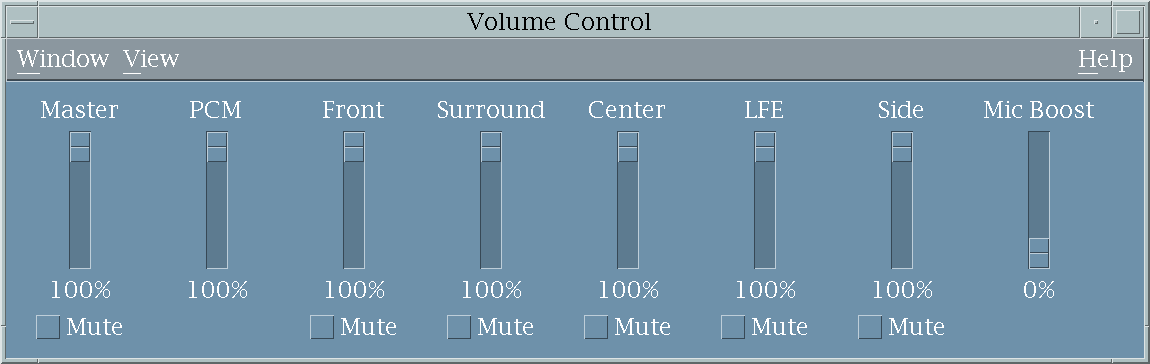
Features and controls
- ALSA device selector: Enumerates available ALSA control (
ctl) devices viasnd_device_name_hint(excludingnull) in a collapsible top drop-down bar. - Per-element mixer columns: Creates a vertical
0–100%slider (XmScale), numeric percentage readout, and Mute toggle (XmToggleButtonwhensnd_mixer_selem_has_playback_switchis present) for each active playback volume element on the selected card. - Live event synchronization: Registers ALSA mixer poll descriptors (
snd_mixer_poll_descriptors) directly with the Xt event loop (XtAppAddInput) so volume or mute changes made by hardware keys or other audio tools update the sliders immediately. - Column filtering: Under the View menu, toggle Show device selector to collapse the top bar, or check/uncheck individual mixer element names to show only the channels you use.
Menus and shortcuts
| Menu item | Description | Shortcut |
|---|---|---|
| Window → Close | Save preferences and exit | Alt+F4 |
| View → Show device selector | Show or hide the ALSA card selector bar | Alt+V, S |
View → <Control Name> | Show or hide individual playback columns | — |
| Help → About Mixer | Open the standard tabbed About dialog | — |
Command-line options and persistence
ck-mixer [-session <session_id>] [Xt options...]
- User configuration:
$XDG_CONFIG_HOME/ck-core/ck-mixer.view(default~/.config/ck-core/ck-mixer.view) storesshow_device_combo(0or1) and per-control visibility flags (control names normalized with_). - Session geometry: Captures
x,y,w,h,device_index, andshow_device_combothroughsession_utils.
Notes and limitations
- Requires at least one active ALSA control device at startup; on headless machines without ALSA sound cards,
ck-mixerexits with status1. - Exposes playback volume elements (
snd_mixer_selem_has_playback_volume) and sets playback levels uniformly across channels (snd_mixer_selem_set_playback_volume_all); capture/recording levels and independent left/right balance sliders are not exposed.