 CK Utilities
Everyday tools for the terminal, with a real interface.
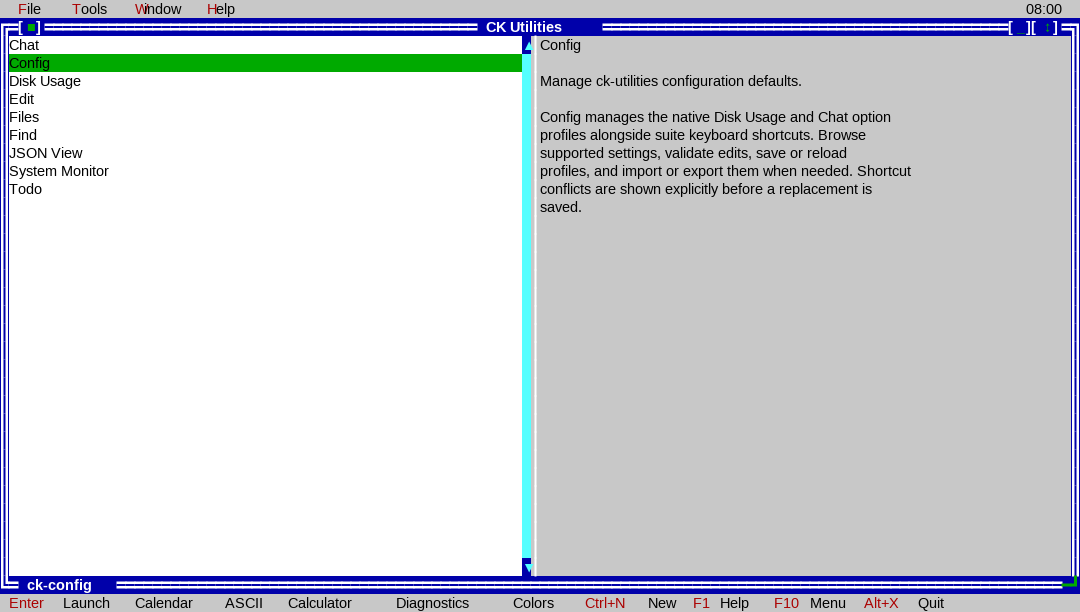
Focused applications in the spirit of the classic utility suites, built on ckVision: a menu bar, movable windows, mouse support, and a footer that always shows the keys you can use right now.
JSON View
Browse JSON as an expandable tree; search, reload, and copy values.
Find
Build guided file searches with filters, previews, cancellation, and deliberate result actions.
Disk Usage
Scan folders in the background and browse directory sizes and file lists.
Files
Browse two directories with previews, marking, and reviewed safe file operations.
Edit
Edit Markdown with search, undo and redo, formatting, links, footnotes, and tables.
Chat
Chat with local GGUF models; manage prompts and models, cancel responses, and export conversations.
Todo
Organize tasks on boards with lanes, notes, due dates, and a durable archive.
System Monitor
Watch CPU, memory, GPU, and loaded Ollama models here and on SSH hosts.
Config
Edit Disk Usage and Chat settings, and manage keyboard shortcuts.
One launcher, nine tools
Start ck-utilities to pick a tool from the launcher, or run any tool
directly: ck-json-view, ck-find, ck-du, ck-edit, ck-chat,
ck-todo, ck-sysmon, ck-config, and ck-files. Every tool shares the same menu
bar, window handling, help, and key footer, so what you learn in one works in all of them.
Start here
- Install CK Utilities on macOS, Linux, or Windows.
- Open the launcher and try a tool.
- Set up Chat with a local model if you want AI assistance that never leaves your computer.
Find an answer
| Task | Guide |
|---|---|
| Download, install, or upgrade | Installation |
| Inspect a JSON file | JSON View |
| Search for files by name, content, date, or size | Find |
| See what is using disk space | Disk Usage |
| Browse, preview, and manage files | Files |
| Write and format Markdown | Edit and Markdown commands |
| Talk to a local model | Chat |
| Keep track of tasks | Todo |
| Watch CPU, memory, and GPU load | System Monitor |
| Change settings and shortcuts | Config |
| Build and test the source | Building from source |
Platforms
CK Utilities runs on macOS, Linux, and Windows.
CK Utilities is free software, provided as-is under the GNU General Public License, version 3, without user support or warranty.