 CK Utilities
ck-edit
ck-edit is the native ckVision Markdown editor. It supports safe file
editing, Markdown transformations, search and replacement, and configurable
keyboard shortcuts.
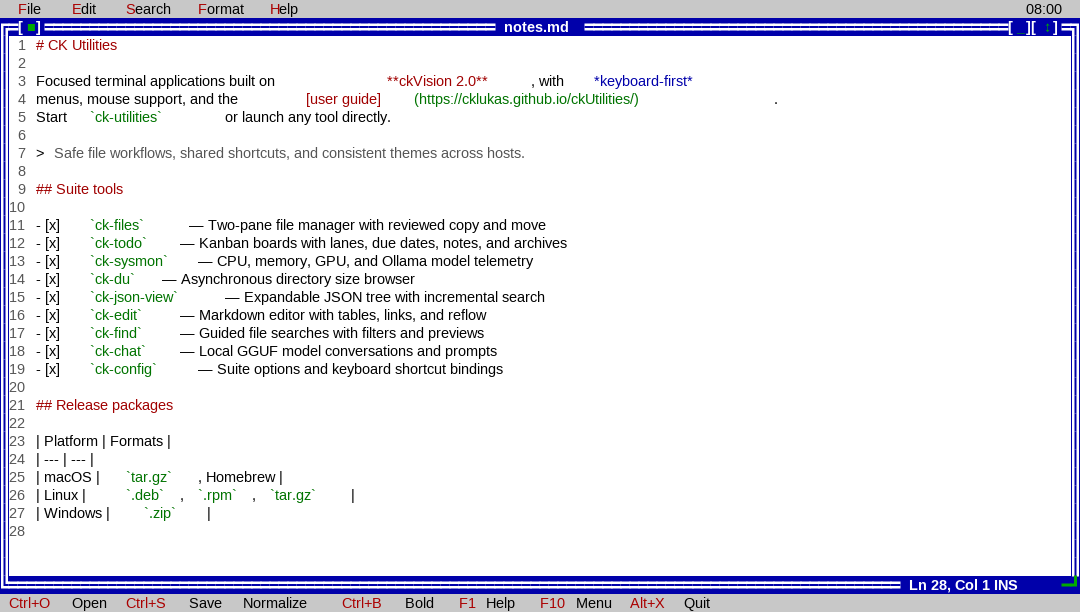
Usage
ck-edit [MARKDOWN_FILE]
Pass a Markdown file to open it at startup, or use File → Open document.
Use --help (or -h) to show the command-line usage, or --version to print
package metadata without opening the editor.
Features
- Open, save, save as, close, and switch Markdown documents with explicit Save, Discard, or Cancel choices for dirty content.
- Undo and redo every supported mutation, viewport-only word wrap, find, replace, and replace-all.
- Normalize whitespace and reflow paragraphs; format selections; edit headings, tasks, quotes, lists, links, images, and footnotes.
- Create and edit pipe tables, including one-step undoable row and column insertion or removal.
- Detect external changes and preserve both versions when local edits are unsaved, requiring an explicit reload, Save As, or continue decision.
- Shared menus, keyboard shortcuts, help, themes, status feedback, and safe bounded file I/O.
Native workflow
- File: open, save, save as, normalize Markdown whitespace, and exit. Dirty documents require an explicit Save, Discard, or Cancel choice.
- Edit: undo, redo, and toggle viewport-only word wrap.
- Search: find, find next, replace, and replace all.
- Format: reflow paragraphs, format selected text, manage headings, tasks, quotes, and lists, and insert or remove links, images, and footnotes. Create pipe tables and add or delete table rows and columns through one-step, undoable Markdown transactions.
If an open file changes outside the editor while it has local unsaved edits,
ck-edit preserves both versions and requires an explicit Save As,
reload/discard, or continue-editing decision.
See Markdown command details for the native transformation behavior and safety rules.