 CK Utilities
ck-utilities
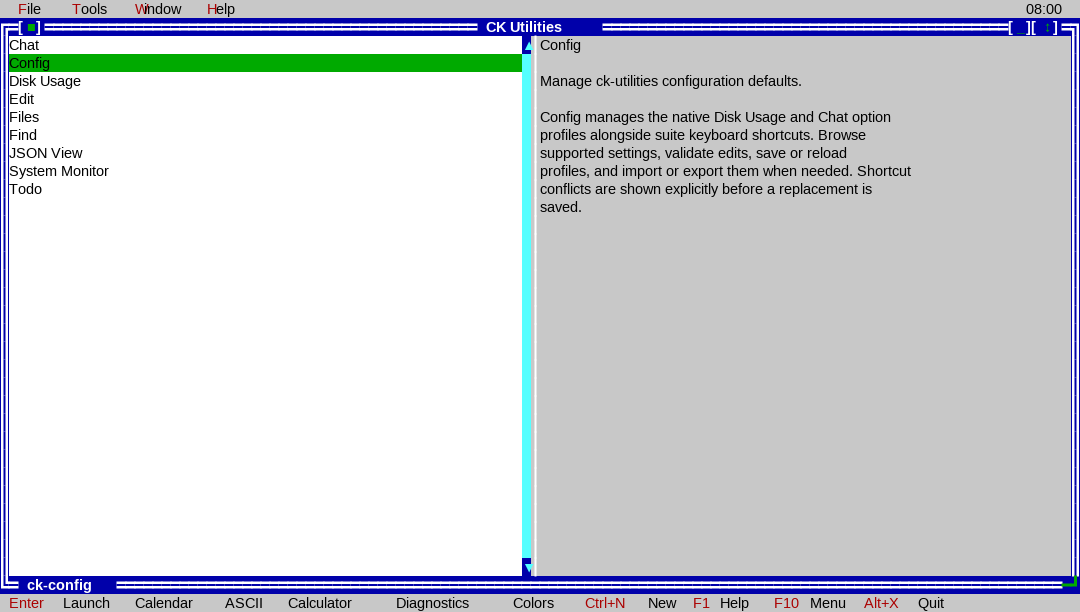
ck-utilities is the native ckVision launcher for the CK Utilities suite. It
lists the installed tools and provides shared window, theme, help, and quit
behavior.
Usage
ck-utilities [--launch TOOL [ARGS...]]
Run ck-utilities without arguments to open the interactive launcher. Use
--launch to start an installed sibling tool directly; the launcher's exit
status is the child tool's exit status.
ck-utilities --launch ck-json-view example.json
ck-utilities --launch ck-du .
Use --help (or -h) to show the command-line usage. An unknown tool or a
missing --launch argument fails before a child process is started. Use
--version to print package metadata without opening the launcher.
Features
- Discover and describe every installed CK Utilities program from one keyboard-first launcher.
- Launch the selected sibling with validated arguments, or launch directly
with
--launch; child exit status is returned to the caller. - Shared menu bar, movable windows, themes, context help, status/key footer, and quit behavior across the suite.
- Native launcher windows for a calendar, ASCII table, calculator, color selector, and bounded application diagnostics.
- Configurable shortcuts through
ck-config, plus clear errors for unknown tools, missing arguments, and unavailable sibling executables.
Native launcher windows
From the Tools menu, open a new launcher window or native windows for the
calendar, ASCII table, calculator, color selector, and bounded application
diagnostics. Select a listed tool and choose Launch selected tool to open
it through the same installed-sibling lookup used by --launch.
Keyboard shortcuts are configurable through ck-config; consult the live menu
and status line for the active bindings.