 CK Utilities
ck-config
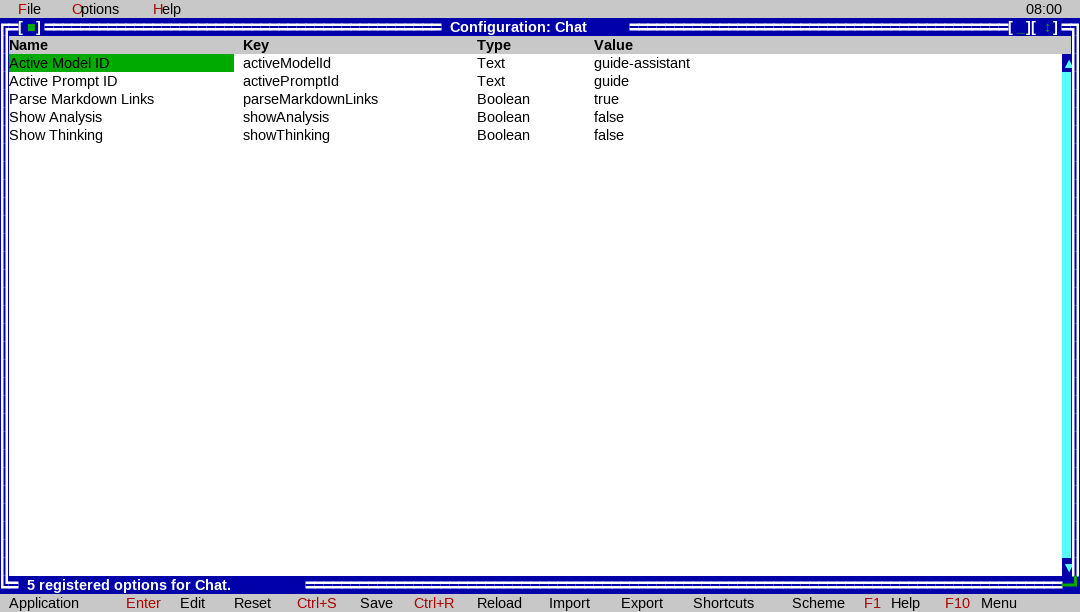
ck-config is the native ckVision configuration editor for CK Utilities. It
currently manages the Disk Usage and Chat option profiles, plus the suite's
keyboard shortcut schemes.
Usage
ck-config
Use --help (or -h) to show the command-line usage, or --version to print
the suite and ckVision versions without opening the editor.
Features
- Browse the registered Disk Usage and Chat option profiles in the native settings editor.
- Edit, reset, save, reload, import, and export supported values with type and range validation before a change is committed.
- Keep derived/read-only settings visible without pretending they are editable, and preserve the existing profile when an import fails.
- Browse shared and application-specific keyboard commands, normalize bindings, detect conflicts, and require explicit replacement approval.
- Distinguish built-in defaults from personal bindings; restoring defaults does not silently erase the personal scheme.
- Use shared menus, help, themes, status feedback, and suite quit behavior.
Option profiles
Use Options to select Disk Usage or Chat, inspect its registered settings, edit or reset the selected setting, and save or reload the active profile. Import and export operate on the selected application's profile. Values are validated before they are committed; failed imports preserve the existing configuration.
Some settings are derived and appear as read-only. They remain visible but cannot be edited or reset from the native interface.
Keyboard shortcuts
Choose Configure keyboard shortcuts to browse commands for each target
application and shared suite commands. Captured shortcuts are normalized before
they are saved. If a binding is already occupied, ck-config identifies the
conflict and requires an explicit replacement.
The application distinguishes built-in default shortcuts from personal bindings. Selecting defaults does not erase personal bindings; the next shortcut edit returns to the personal scheme.